




POSTMAN JOB + MLO
 ESX
ESX  QBCore
  QBox
QBox- Shortest Route Planner Plan the shortest path with urgent mail first
- Fragile Package Minigame Slowly place the box through the timing UI
- Dog Yard Delivery Skip the treat and get chased and hurt
- Delivery Tablet Help Stop details & instructions to protect your pay
- Mail Route Board Pick zone, difficulty & start your post van run
- Pay Multiplier System Clean deliveries boost pay; mistakes deduct
This product comes with an escrowed library dependency.


Bundle & save
Get Postman Job in a pack.
Pack it with more scripts and pay up to 45% less than buying them one by one.
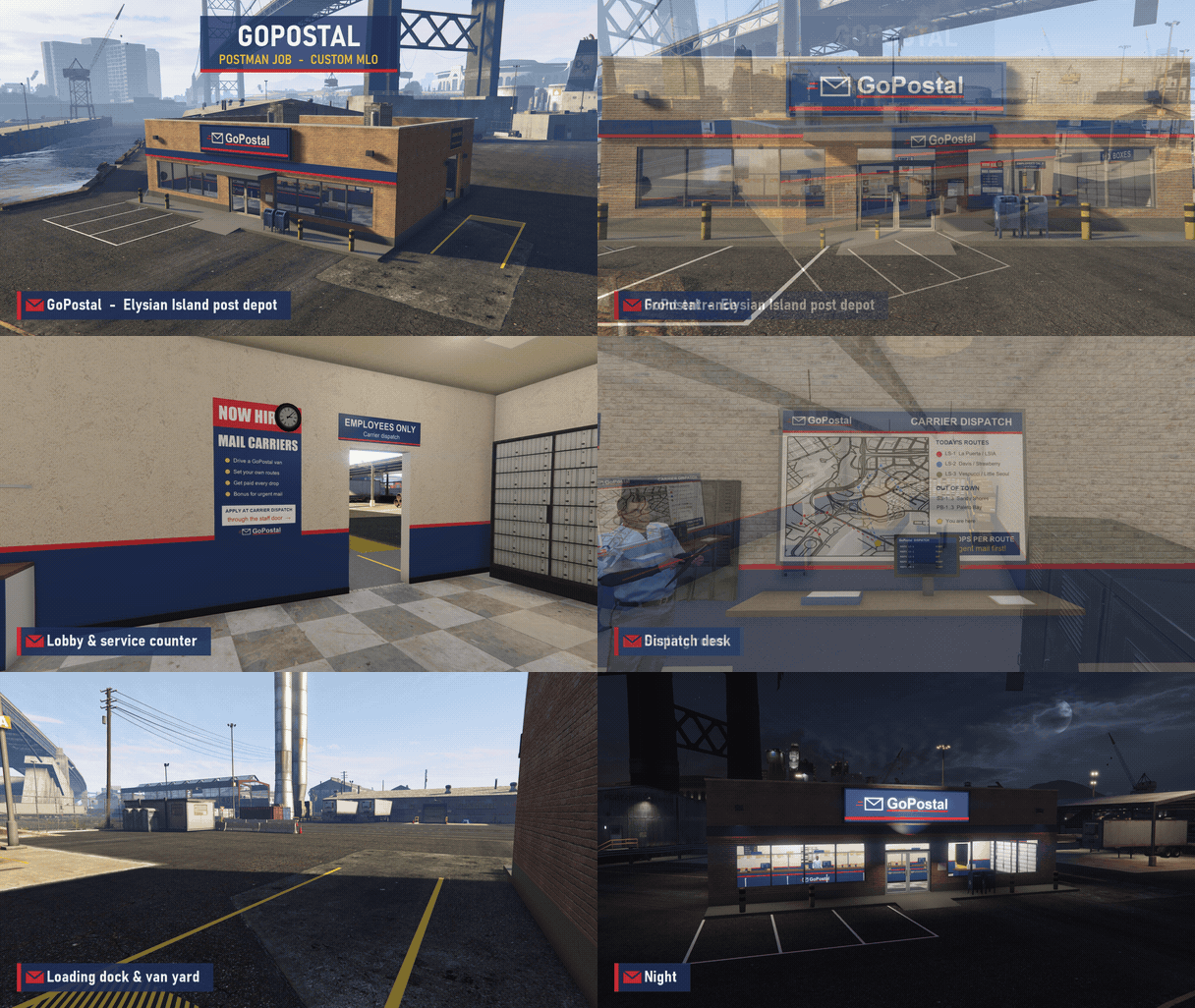
Custom GoPostal Depot MLO
Custom GoPostal post depot MLO on Elysian Island, included with the resource — a working mail hub with a public lobby, staff area, sorting room, and loading dock for the post vans.
- Branded Exterior — GoPostal signage, storefront windows, and a parking lot out front.
- Front Entrance — Glass doors with blue mail drop boxes right outside.
- Lobby & Service Counter — A customer counter with posters and notices on the walls.
- Staff Area — A back-of-house space for the postal workers.
- Dispatch Desk — A dedicated dispatch desk for the depot staff.
- Sorting Room — Shelves, bins, and tables stacked with mail and parcels.
- Loading Dock & Van Yard — Loading bay and yard space for the post vans.
- Night Lighting — Lit signage and interior lights keep the depot glowing after dark.
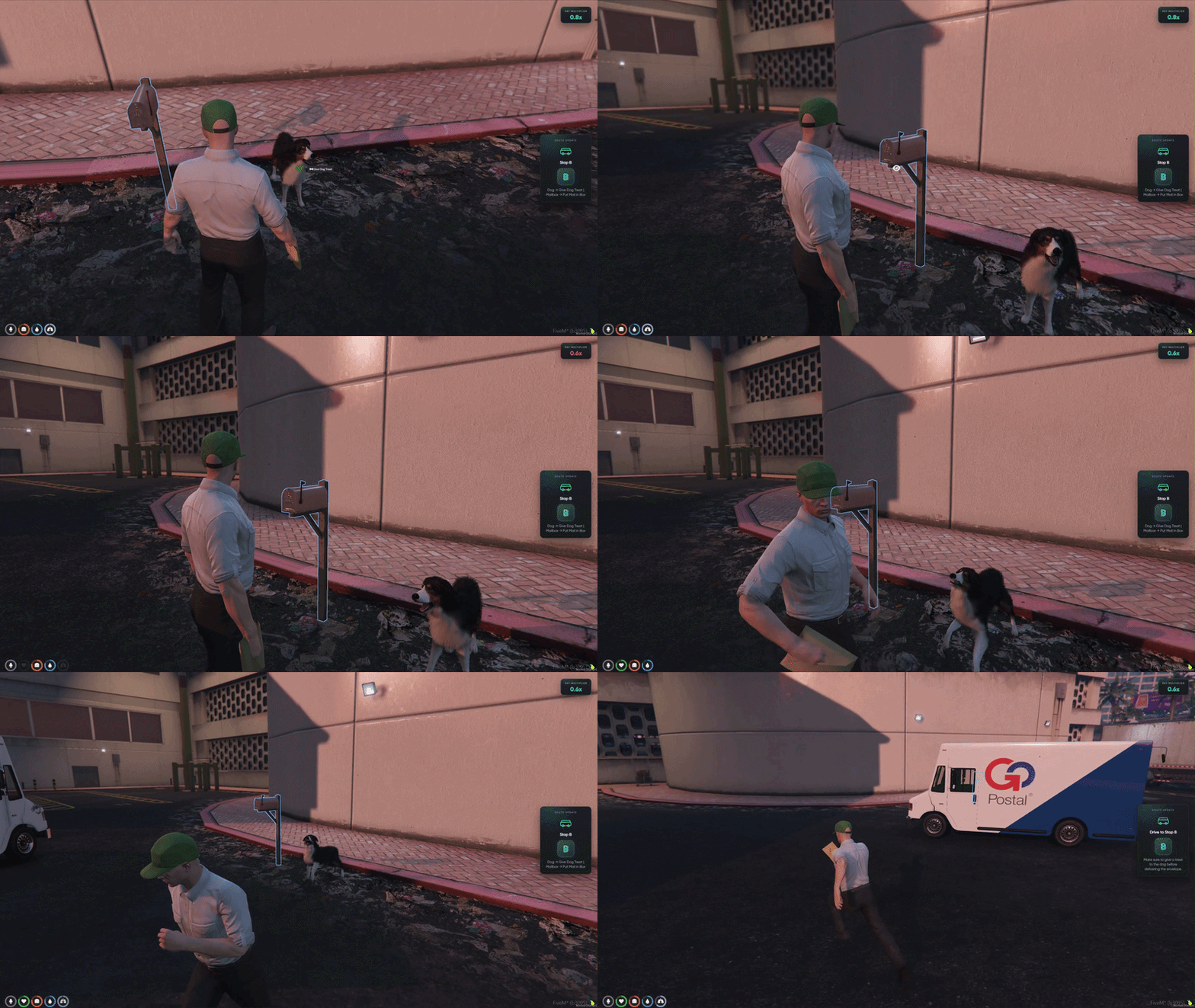
Dog Yard Delivery
Guard dog stops where skipping the treat has real consequences — calm the dog first or get chased down and take a hit to your live pay multiplier.
- Dog on Guard — A barking dog sits at the yard stop blocking the mailbox.
- Give a Treat First — Target the dog and use Give Dog Treat before delivering mail.
- Skip the Treat — Try to deliver without calming the dog and it will turn hostile.
- Chased & Hurt — The dog attacks the player, dealing damage on contact.
- Pay Multiplier Hit — Getting bitten lowers your live payout multiplier for the run.
- Recover & Deliver — Calm the dog with a treat, then put the envelope in the mailbox to finish the stop.
- Stop-by-Stop Stakes — Every yard delivery can protect or cost you bonus pay.
- Read the Tablet — The work tablet tells you when a dog stop needs a treat before drop-off.
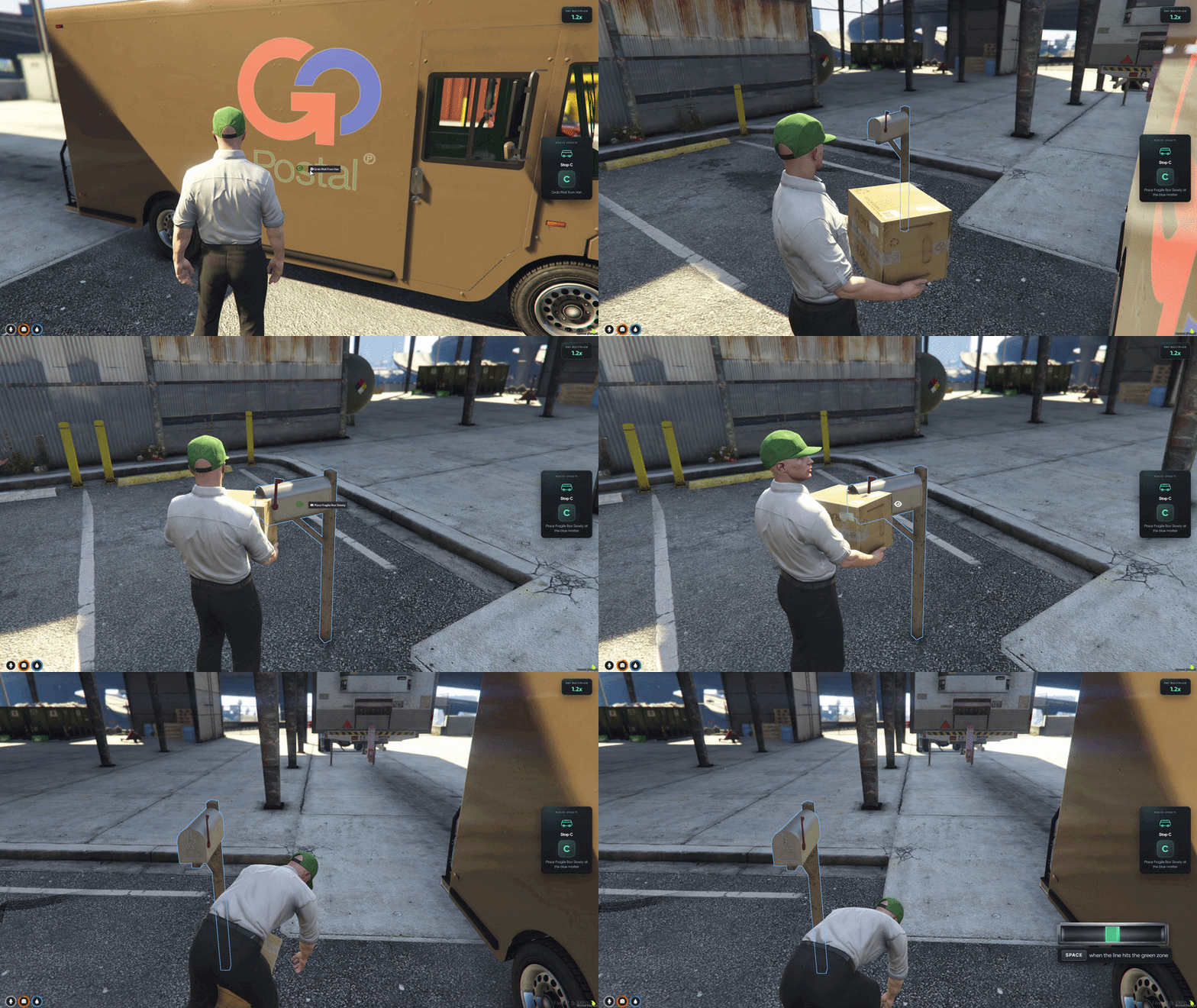
Fragile Package Minigame
Placement minigame for fragile deliveries — slowly set the box down through timed inputs instead of a quick drop, or break the package and lose multiplier pay.
- Heavy Fragile Box — Carry the package from the post van to the delivery spot.
- Minigame UI Opens — A timing bar appears on screen when you go to place the box.
- Watch the Moving Line — A marker sweeps back and forth across the bar.
- Hit the Green Zone — Press SPACE when the line lands in the green sweet spot.
- Slow Placement — Each correct press gently lowers the box closer to the ground.
- Do Not Rush It — Miss the timing or drop too fast and the fragile box breaks.
- Multiplier Penalty — A broken box deducts from your pay multiplier for the mission.
- Clean Finish — Nail the placement and keep your route bonus intact.
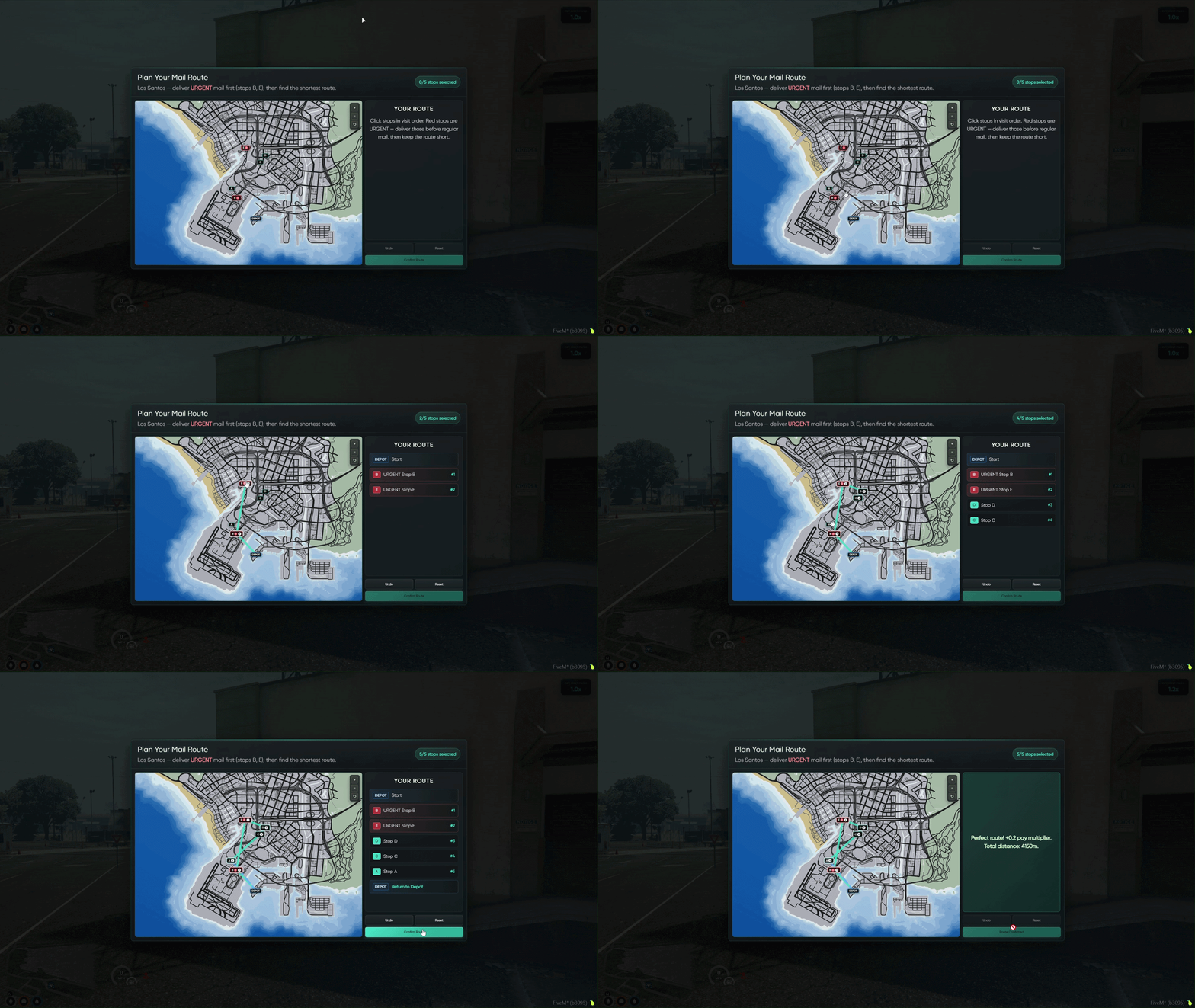
Shortest Route Planner
Route-planning minigame on the GTA map — pick the shortest path across all five stops while delivering URGENT packages first.
- Plan Before You Drive — The route minigame opens at the start of every mail run.
- Five Stops on the Map — Click delivery points on the interactive GTA map to set visit order.
- URGENT Mail First — Red urgent stops must be completed before regular stops on your route.
- Find the Shortest Path — Arrange stops into the most efficient loop back to the depot.
- Confirm Your Route — Submit your plan and the game checks distance and urgent order.
- Perfect Route Bonus — Nail the shortest path with urgent mail first and your pay multiplier goes up.
- Wrong Order Costs You — A longer route or urgent stops placed too late deducts from your multiplier before deliveries even begin.
- Start Strong — Smart planning sets the tone for the whole post van run.
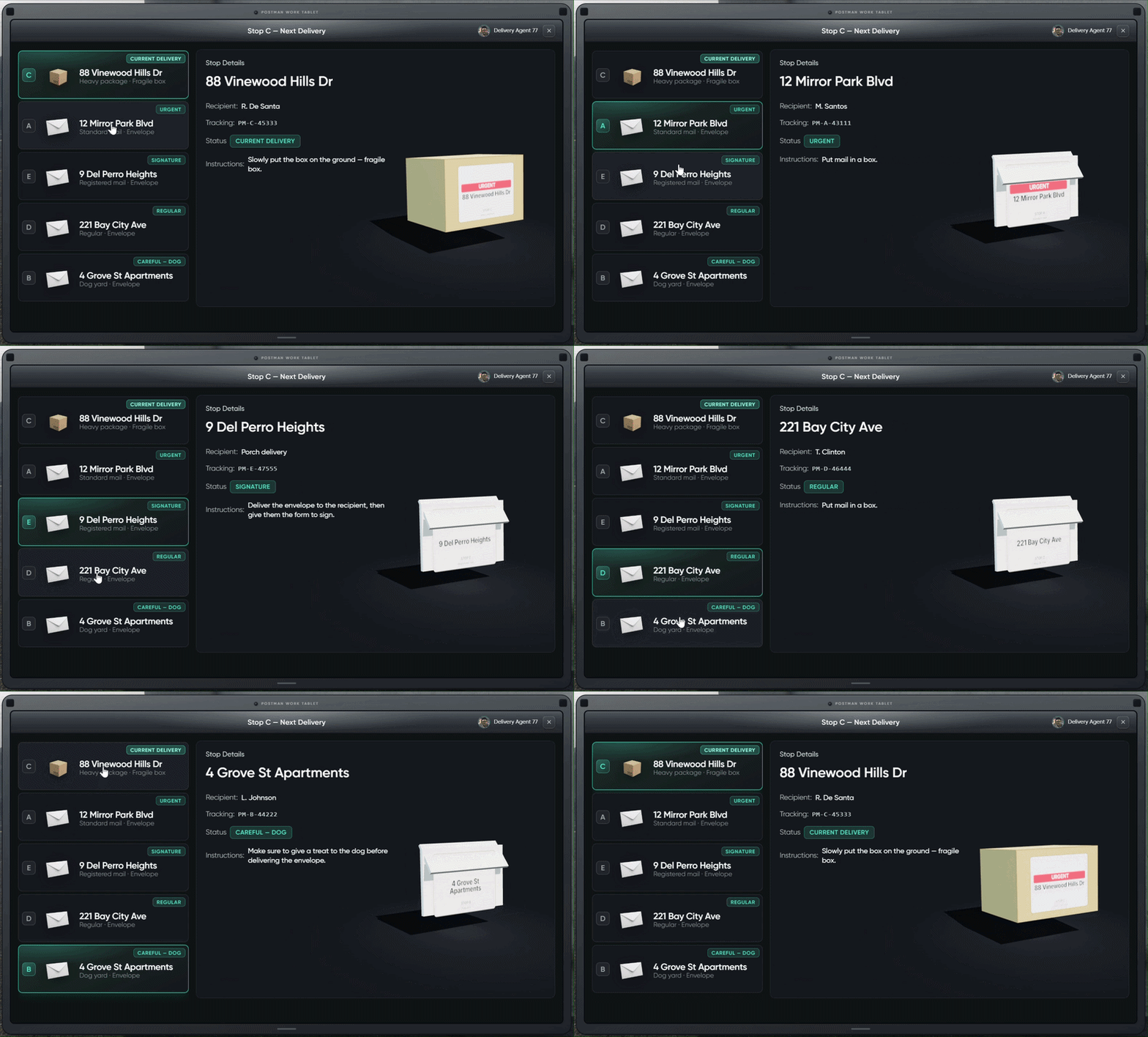
Delivery Tablet Help
Postman Work Tablet shown before each stop — review your route, read stop instructions, and keep your reward multiplied instead of deducted.
- Tablet Before Each Stop — Review your next delivery on the in-game work tablet before driving.
- Full Route Overview — All five stops listed with letter labels, addresses, and delivery types.
- Stop Details Panel — Select any stop to see recipient, tracking number, and current status.
- Clear Instructions — Each stop type shows exactly what to do (mailbox drop, dog treat, signature, fragile box, etc.).
- Current Delivery Highlighted — The active stop is marked so you know what is up next.
- Protect Your Pay — Follow the on-screen instructions to avoid mistakes that deduct your multiplier.
- Stay at Full Bonus — Clean deliveries keep your payout multiplier high through the entire route.
- Mail Route Board — Pick your zone, choose difficulty, and start your post van run from one clean menu.