
Limited Time
10% OFF — NANO10
Limited Time
10% OFF — NANO10
Limited Time
10% OFF — NANO10
Limited Time
10% OFF — NANO10
Limited Time
10% OFF — NANO10
Limited Time
10% OFF — NANO10
Limited Time
10% OFF — NANO10
Limited Time
10% OFF — NANO10
Limited Time
10% OFF — NANO10
Limited Time
10% OFF — NANO10
All bundles

Inside this pack Tap one to see its features

Bundle · 5 scripts Best value

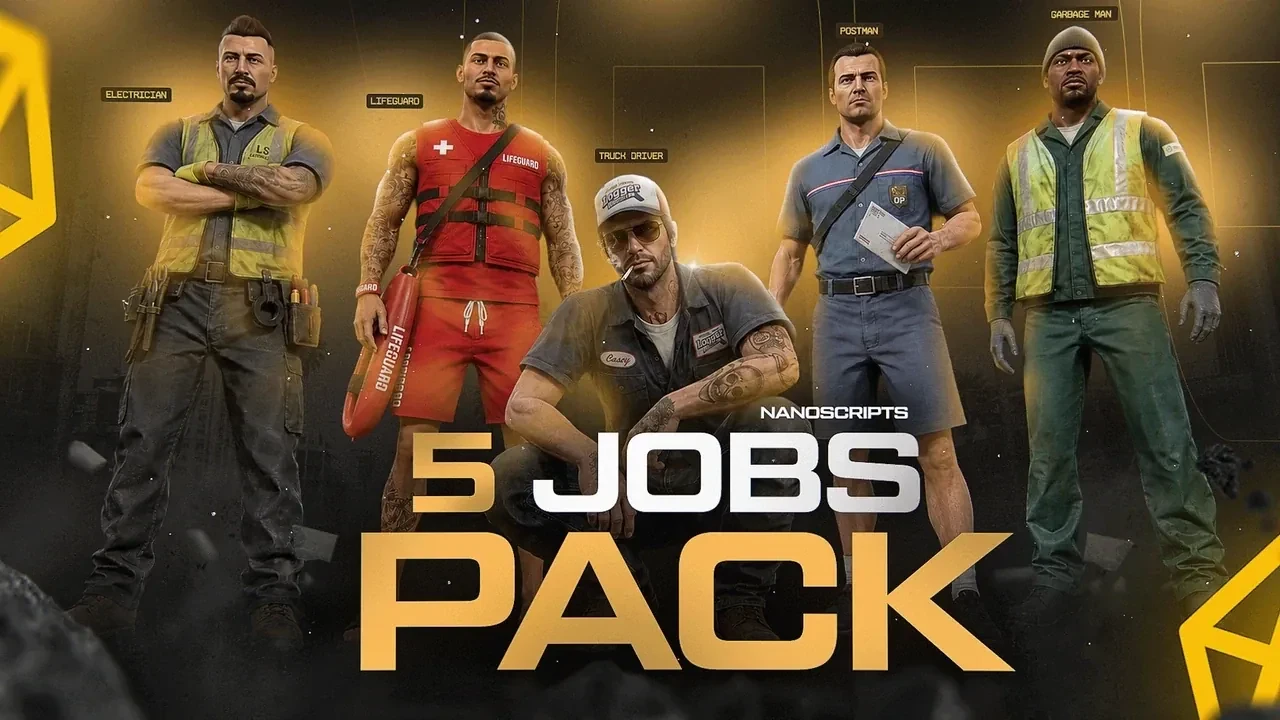
5 Jobs Pack

Five civilian jobs, each with its own custom MLO. Something for every new player to do on day one.

Edition

60.99€ 109.95€ -45%

You save 48.96€ compared to buying the 5 scripts one by one.

Add to basket
  • Instant delivery
  • Lifetime free updates
  • ESX, QBCore & QBox
  • Discord support

Why the pack

5 scripts. One price.

Every script in the 5 Jobs Pack is the full version sold on its own page. Take them together and keep the difference.

  • 5 custom MLOs. A garbage depot, a freight depot, a post depot, an electric depot and a lifeguard HQ.
  • Real minigames. Voltmeters, CPR, fragile parcels and forklifts, not progress bars.
  • Better with friends. Team up on garbage and transport runs for bonus pay.

5 Jobs Pack · Open SourceOn its own

  • Garbage JobJob + depot MLO 19.99€
  • Transport JobJob + freight depot MLO 19.99€
  • Postman JobJob + post depot MLO 19.99€
  • Electrician JobJob + electric depot MLO 19.99€
  • Baywatch JobJob + lifeguard HQ MLO 29.99€
Bought one by one
109.95€
Pack discount
-48.96€
You pay
60.99€
Add to basket

Inside the pack

Every script. Every feature.

01/05

Garbage Job

Job + depot MLO
On its own 19.99€Included
Garbage Job for FiveM, in game

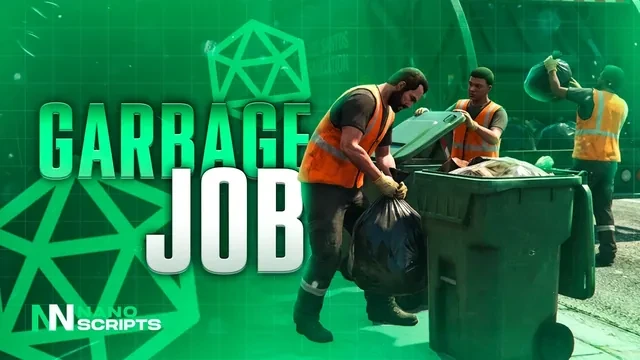
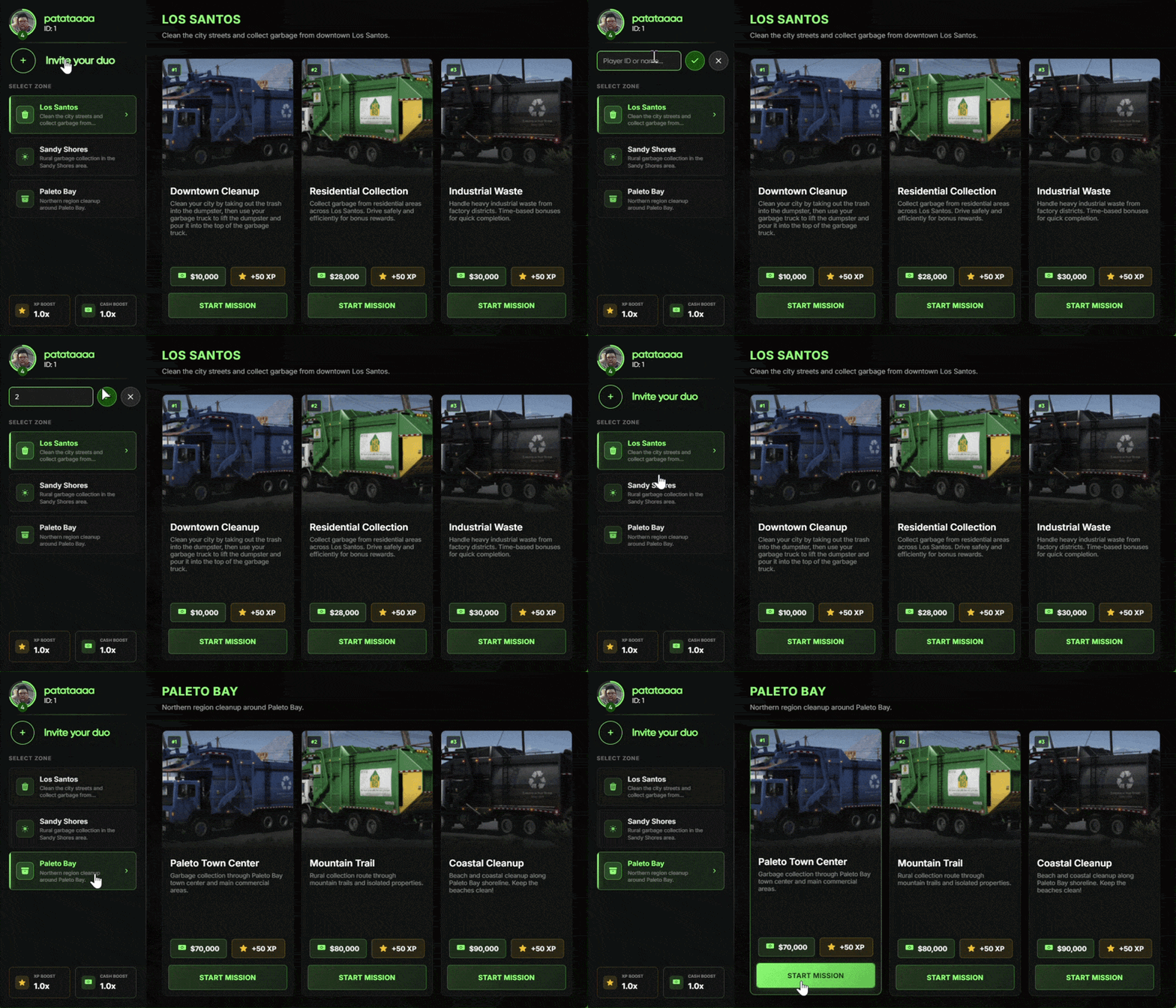
Duo garbage runs: one player bags the trash, the other works the truck. 45 pickup spots, reputation and a custom depot MLO.

  • Multiplayer Job Bag-and-truck duo missions
  • 45 Locations Configurable pickups across the map
  • Solo or Duo Team up for higher pay & rep
  • Custom Depot MLO Hub + truck spawn included
  • Reputation System Earn configurable XP for every haul
  • Group Invites Send by server ID, accept Y/N
  • Truck Operations Lift & empty dumpsters realistically

This product comes with an escrowed library dependency.

See all 2 Garbage Job features Hide the Garbage Job feature tour
Ultimate Multiplayer Garbage Job

Ultimate Multiplayer Garbage Job

This is the ultimate multiplayer garbage job your server players will actually enjoy—built for teamwork, progression, and immersive gameplay.

  • Multiplayer garbage job where you can invite a friend to work together
  • One player collects trash bags while the other operates the garbage truck
  • Option to complete missions solo if no partner is available
  • Includes a custom garbage depot MLO
  • 45 customizable garbage pickup locations across the map
  • Earn increased and configurable reputation rewards
  • Receive higher customizable payouts when completing missions as a duo
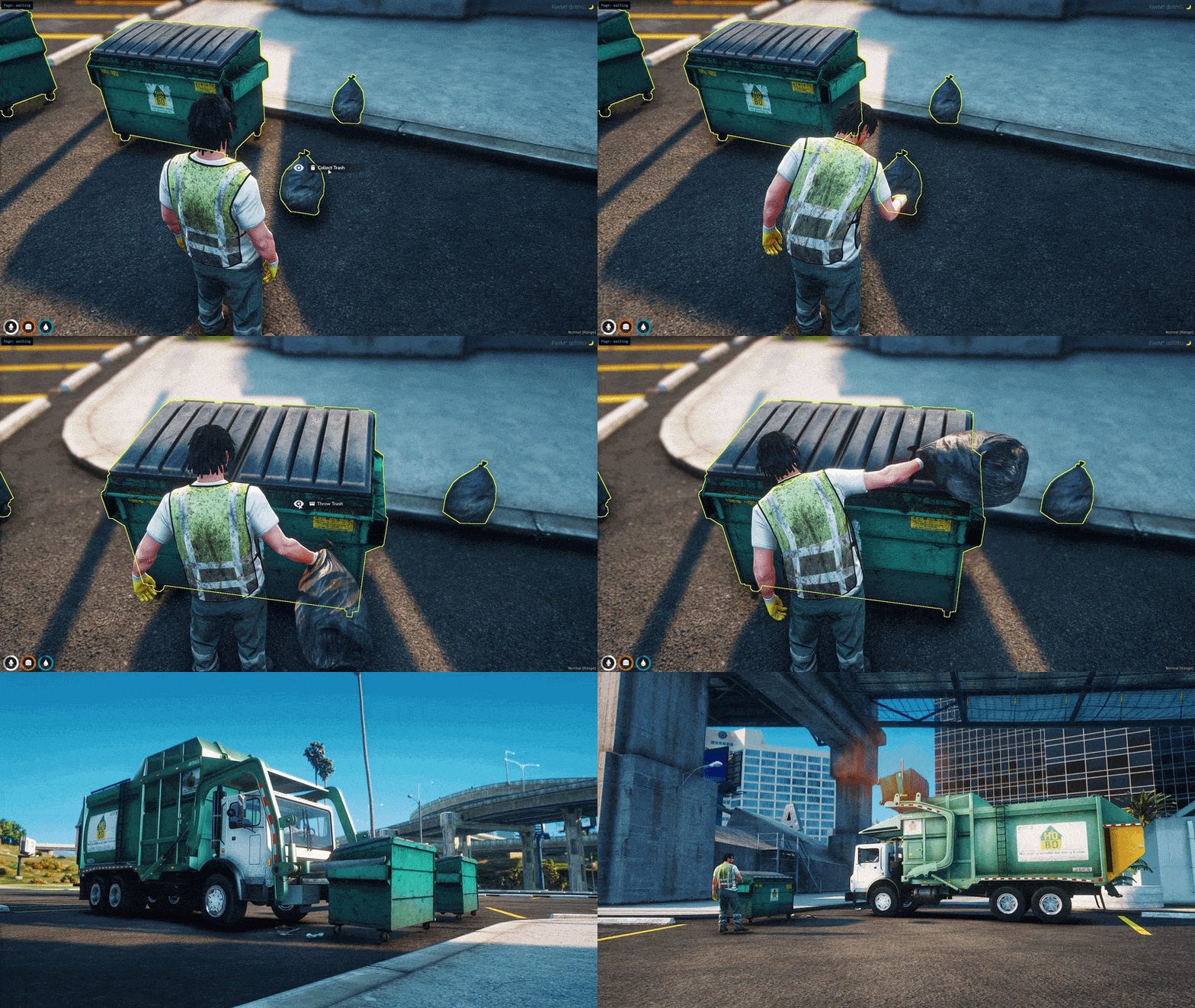
Job Progression Flow

Job Progression Flow

Here's how players will experience and progress through the garbage job from start to finish.

  • Go to the job search location marked on the map
  • Interact with the marker to open the job UI
  • Invite other players to join your group
  • Enter the player's server ID and send an invite
  • Wait for them to accept or decline using the Y or N key
  • Once your group is ready, select the mission location
  • Start the mission
  • Collect trash bags and dispose of them in dumpsters
  • Use the garbage truck to lift and empty the bins
  • Return the truck to the depot to complete the mission
02/05

Transport Job

Job + freight depot MLO

On its own 19.99€Included
Transport Job for FiveM, in game

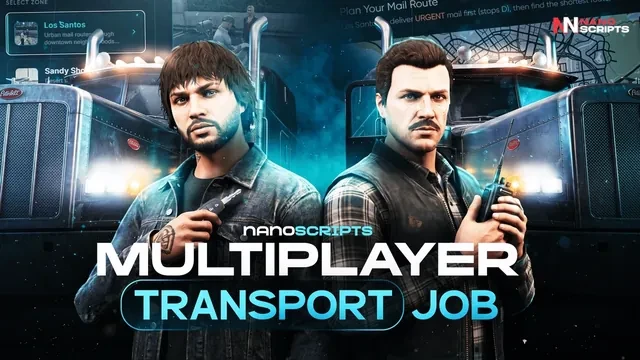
Forklift cargo, container hauls and car transport, solo or with a partner, run from a custom Longshore Freight depot MLO.

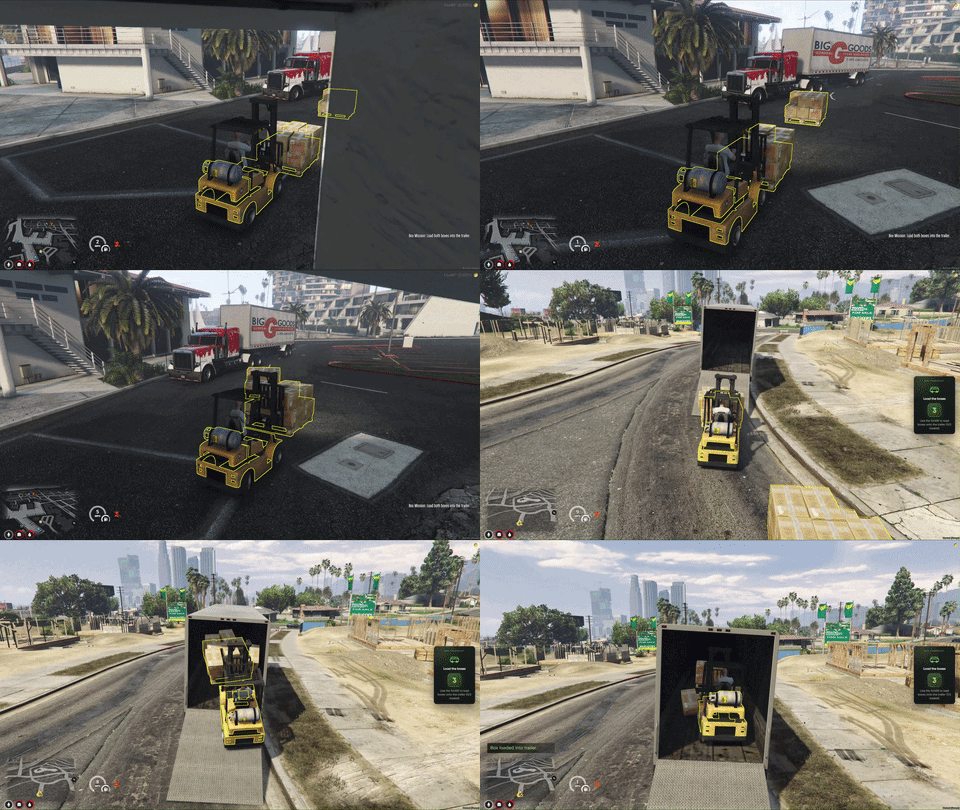
  • Forklift Cargo Runs Pick up boxes with forklifts and load the trailer
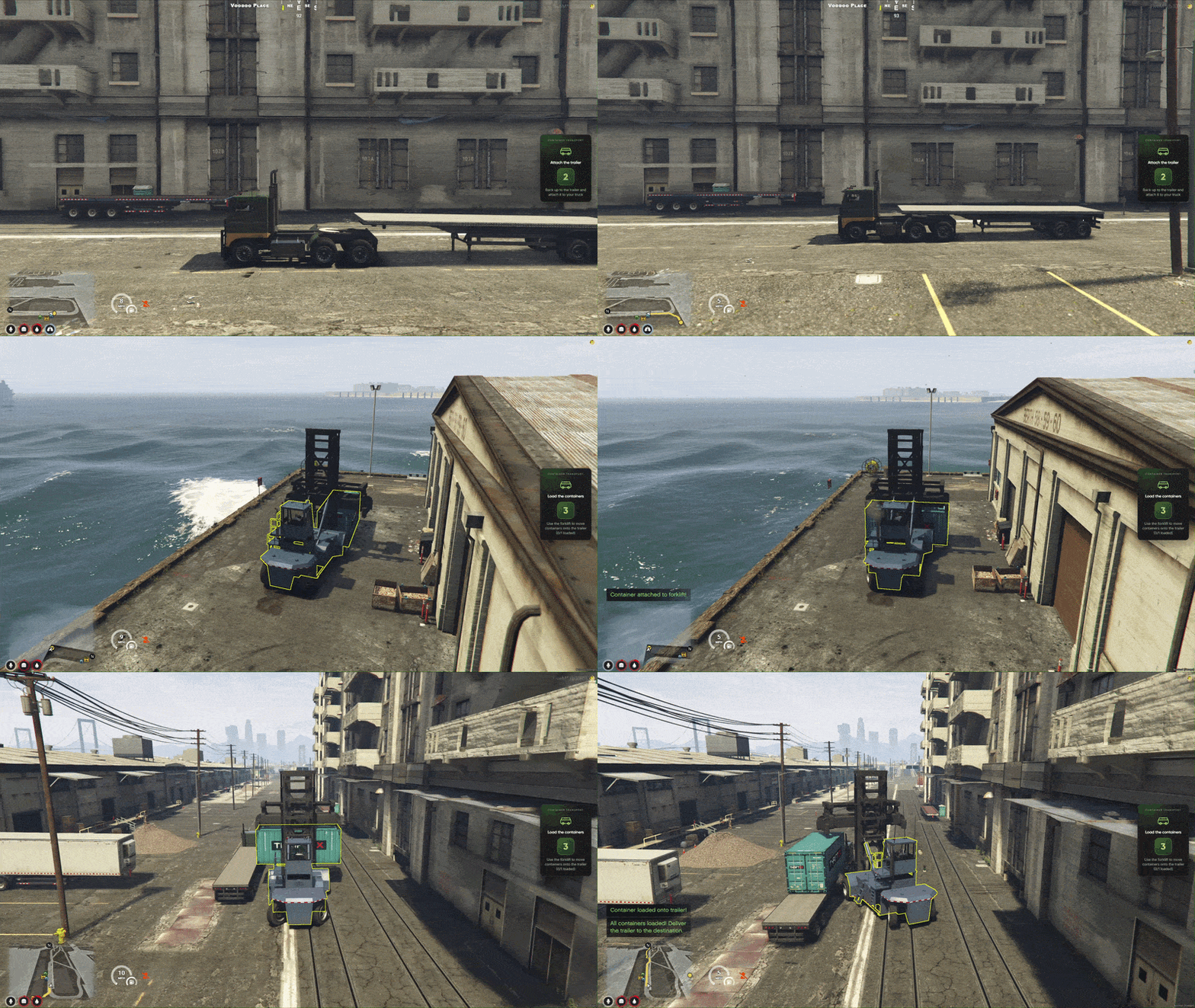
  • Container Haul Missions Lift containers in the yard and haul on a flatbed
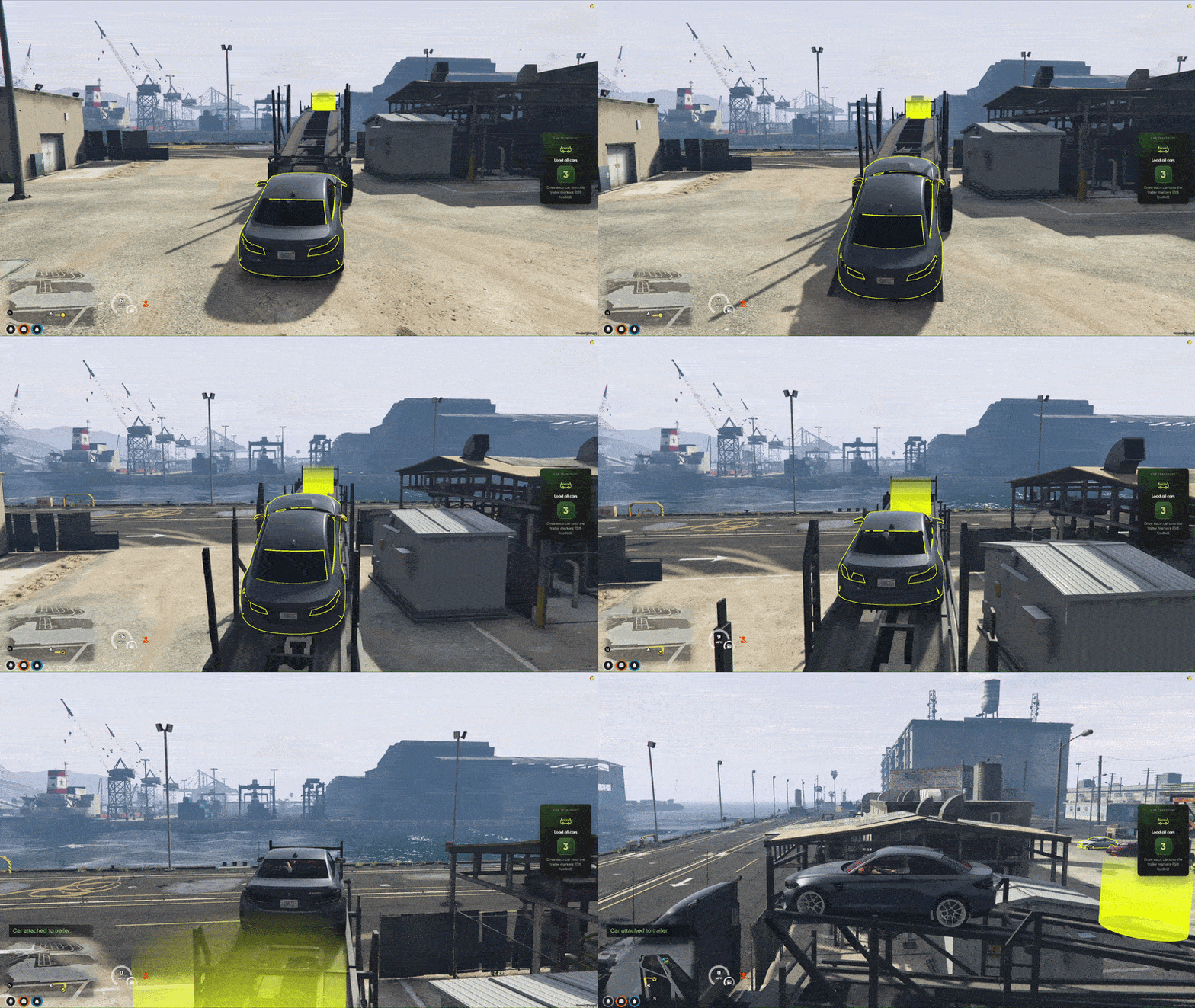
  • Car Transport Runs Load vehicles onto the trailer and deliver the haul
  • Mission Job Board Browse routes, rewards & start runs from one menu
  • Step-by-Step Guidance On-screen helper tells you what to do each stage
  • Duo Trucking Runs Team up with a partner and share bonus rewards

This product comes with an escrowed library dependency.

See all 4 Transport Job features Hide the Transport Job feature tour
Custom Longshore Freight MLO

Custom Longshore Freight MLO

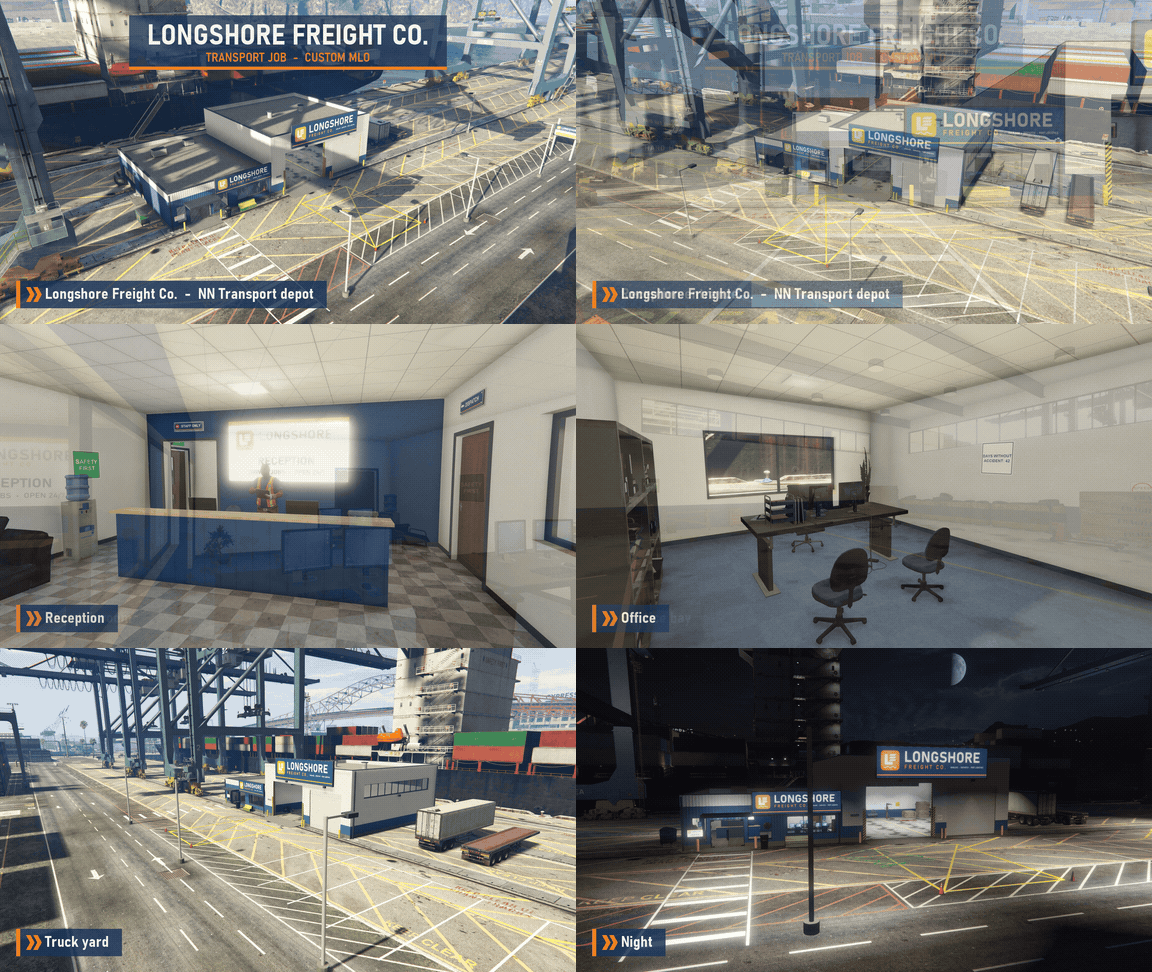
Custom Longshore Freight Co. transport depot MLO at the port, included with the resource — reception, dispatch room, drivers lounge, office, service bay, and a full truck yard.

  • Branded Exterior — Longshore Freight Co. signage on a depot surrounded by cranes and shipping containers.
  • Reception — Front entrance and reception desk with a lit wall display and waiting area.
  • Dispatch Room — Desks with multi-monitor workstations for planning every run.
  • Drivers Lounge — A place for drivers to take a break between hauls.
  • Office — A private office space inside the depot.
  • Service Bay — A large indoor bay for working on the trucks.
  • Truck Yard — Open yard space for rigs, trailers, and containers.
  • Night Lighting — Lit signage and yard lights keep the depot looking sharp after dark.
Forklift Cargo Operations

Forklift Cargo Operations

Logistics missions where players grab a truck, use forklifts, and move boxed cargo across the map. Solo or with a partner — GPS and on-screen guidance keep every step clear.

  • Get Your Rig Ready — Pick up your truck, hook up the trailer, and head to the cargo zone.
  • Forklift Work — Use forklifts to pick up box piles and move them where they need to go.
  • Load the Trailer — Drive cargo onto the trailer and get everything secured for transport.
  • Deliver to the Depot — Haul the load to the unload area and drop off all boxes to finish the job.
  • Three Routes — Short, medium and long box runs, with higher pay on tougher routes.
  • Step-by-Step Guidance — An on-screen helper tells you exactly what to do at each stage.
  • Play With a Friend — Bring a partner and run the job together for bonus rewards.
  • Level Up & Earn More — Gain XP and unlock better payouts as you rank up.
Container Haul Missions

Container Haul Missions

Heavy-duty container work for players who want bigger rigs, yard operations, and full delivery loops from pickup to drop-off.

  • Big Rig Setup — Start with a hauler, flatbed trailer and yard forklift ready to go.
  • Pick Up Containers — Lift shipping containers in the yard and move them into position.
  • Load the Flatbed — Get each container onto the trailer before hitting the road.
  • Long-Haul Delivery — Drive to the destination and leave the trailer at the drop point.
  • Finish the Run — Return the truck to complete the mission and collect your pay.
  • Three Routes — Port pickup, industrial haul and express delivery, with rising rewards.
  • Clear Objectives — Important vehicles and cargo are highlighted so nothing gets missed.
  • Built for Long Jobs — A smooth flow from start to finish, even on extended runs.
Car Transport Runs

Car Transport Runs

Premium car hauling for servers that want structured trucking gameplay — load multiple vehicles, deliver the trailer, and wrap up with a clean return.

  • Car Hauler Rig — Spawn a truck and multi-car trailer built for stacked vehicle loads.
  • Load Every Vehicle — Drive each car onto the trailer until the full load is ready.
  • Guided Loading — Clear markers show where each car needs to go on the trailer.
  • Drop Off the Trailer — Deliver the loaded trailer to the destination point.
  • Return the Truck — Bring the empty rig back to finish the mission.
  • Three Routes — Premium delivery, multi-car haul and luxury transport, with tiered payouts.
  • Modern Job Board — Browse missions, see rewards, and start or stop runs from one clean menu.
  • Duo Payouts — Team up with another player and share the rewards when the job is done.
03/05

Postman Job

Job + post depot MLO

On its own 19.99€Included
Postman Job for FiveM, in game

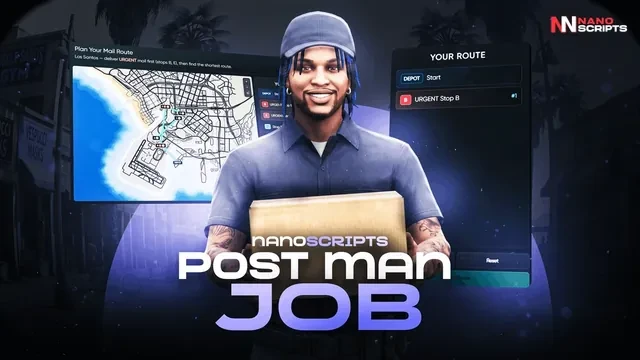
Mail routes with real minigames: plan the shortest route, set fragile parcels down gently and get past the guard dogs. Custom GoPostal depot MLO.

  • Shortest Route Planner Plan the shortest path with urgent mail first
  • Fragile Package Minigame Slowly place the box through the timing UI
  • Dog Yard Delivery Skip the treat and get chased and hurt
  • Delivery Tablet Help Stop details & instructions to protect your pay
  • Mail Route Board Pick zone, difficulty & start your post van run
  • Pay Multiplier System Clean deliveries boost pay; mistakes deduct

This product comes with an escrowed library dependency.

See all 5 Postman Job features Hide the Postman Job feature tour
Custom GoPostal Depot MLO

Custom GoPostal Depot MLO

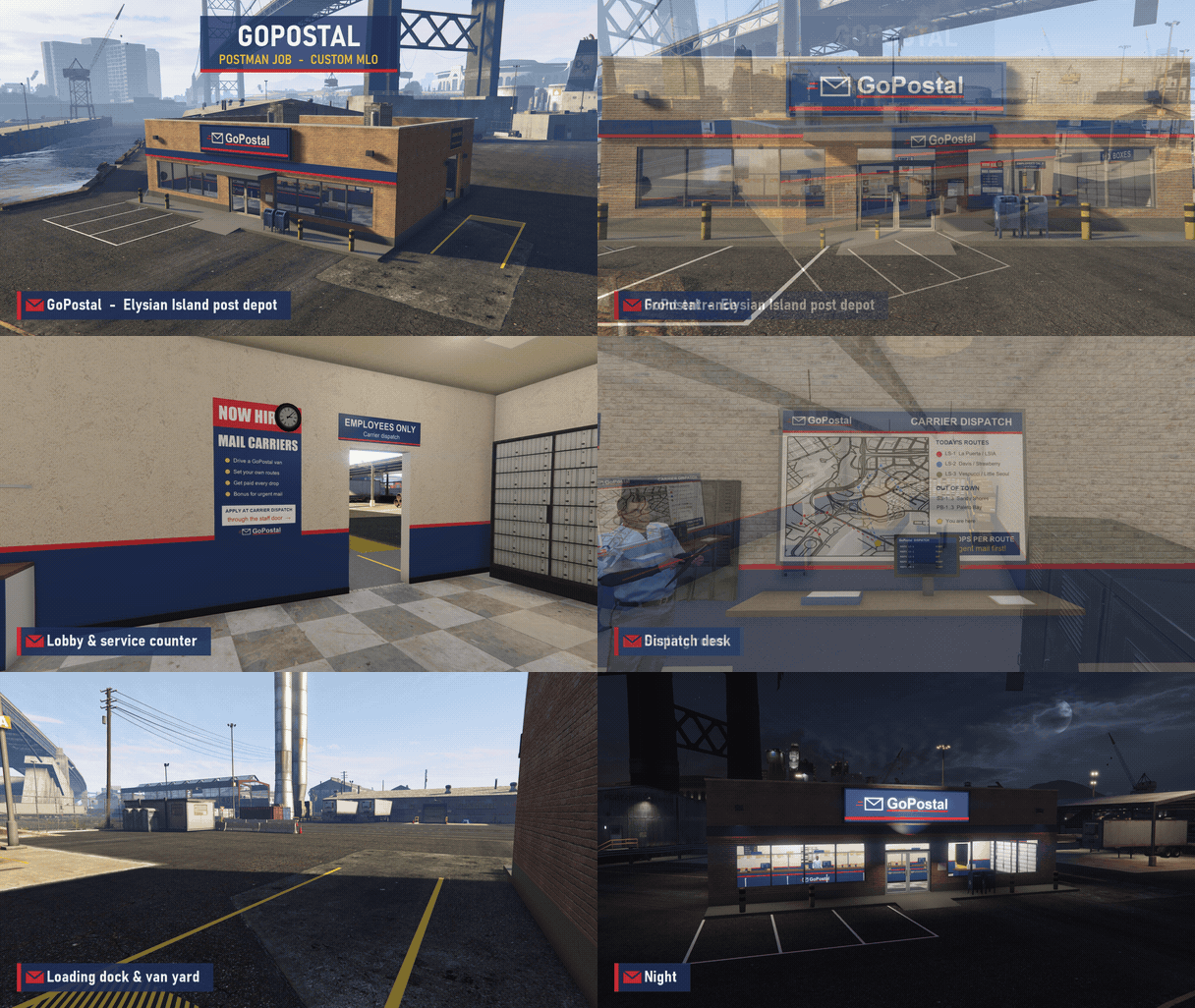
Custom GoPostal post depot MLO on Elysian Island, included with the resource — a working mail hub with a public lobby, staff area, sorting room, and loading dock for the post vans.

  • Branded Exterior — GoPostal signage, storefront windows, and a parking lot out front.
  • Front Entrance — Glass doors with blue mail drop boxes right outside.
  • Lobby & Service Counter — A customer counter with posters and notices on the walls.
  • Staff Area — A back-of-house space for the postal workers.
  • Dispatch Desk — A dedicated dispatch desk for the depot staff.
  • Sorting Room — Shelves, bins, and tables stacked with mail and parcels.
  • Loading Dock & Van Yard — Loading bay and yard space for the post vans.
  • Night Lighting — Lit signage and interior lights keep the depot glowing after dark.
Dog Yard Delivery

Dog Yard Delivery

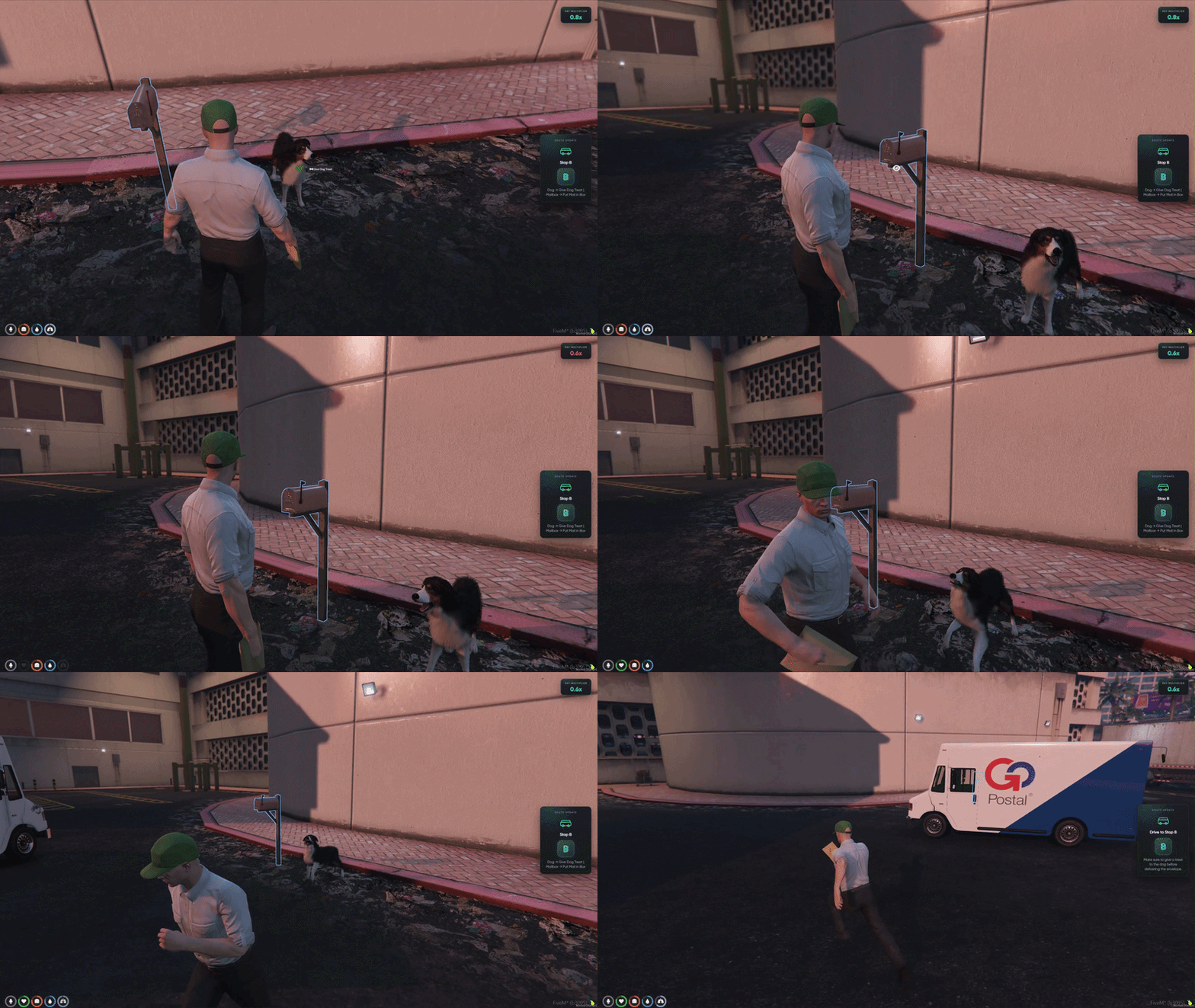
Guard dog stops where skipping the treat has real consequences — calm the dog first or get chased down and take a hit to your live pay multiplier.

  • Dog on Guard — A barking dog sits at the yard stop blocking the mailbox.
  • Give a Treat First — Target the dog and use Give Dog Treat before delivering mail.
  • Skip the Treat — Try to deliver without calming the dog and it will turn hostile.
  • Chased & Hurt — The dog attacks the player, dealing damage on contact.
  • Pay Multiplier Hit — Getting bitten lowers your live payout multiplier for the run.
  • Recover & Deliver — Calm the dog with a treat, then put the envelope in the mailbox to finish the stop.
  • Stop-by-Stop Stakes — Every yard delivery can protect or cost you bonus pay.
  • Read the Tablet — The work tablet tells you when a dog stop needs a treat before drop-off.
Fragile Package Minigame

Fragile Package Minigame

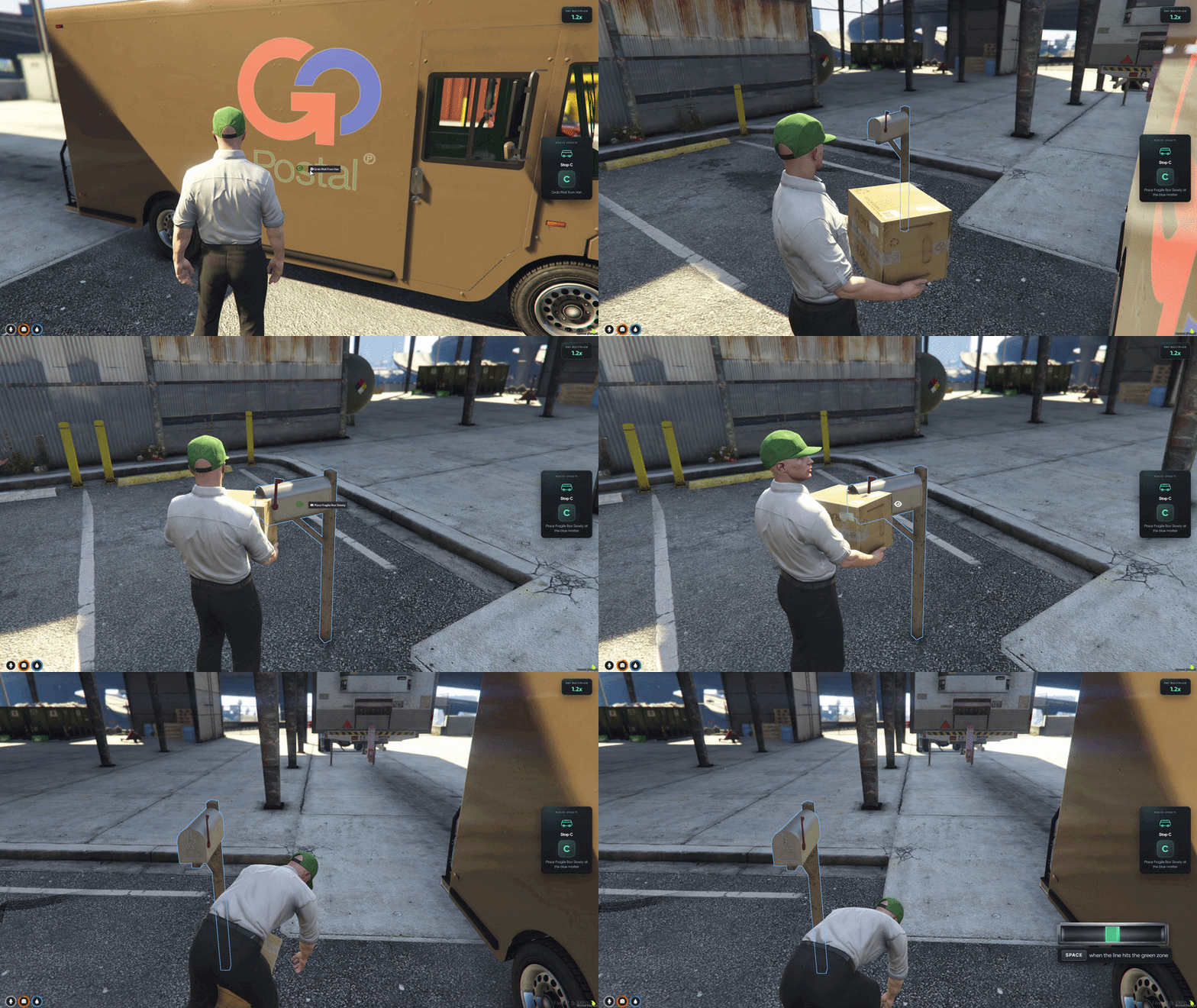
Placement minigame for fragile deliveries — slowly set the box down through timed inputs instead of a quick drop, or break the package and lose multiplier pay.

  • Heavy Fragile Box — Carry the package from the post van to the delivery spot.
  • Minigame UI Opens — A timing bar appears on screen when you go to place the box.
  • Watch the Moving Line — A marker sweeps back and forth across the bar.
  • Hit the Green Zone — Press SPACE when the line lands in the green sweet spot.
  • Slow Placement — Each correct press gently lowers the box closer to the ground.
  • Do Not Rush It — Miss the timing or drop too fast and the fragile box breaks.
  • Multiplier Penalty — A broken box deducts from your pay multiplier for the mission.
  • Clean Finish — Nail the placement and keep your route bonus intact.
Shortest Route Planner

Shortest Route Planner

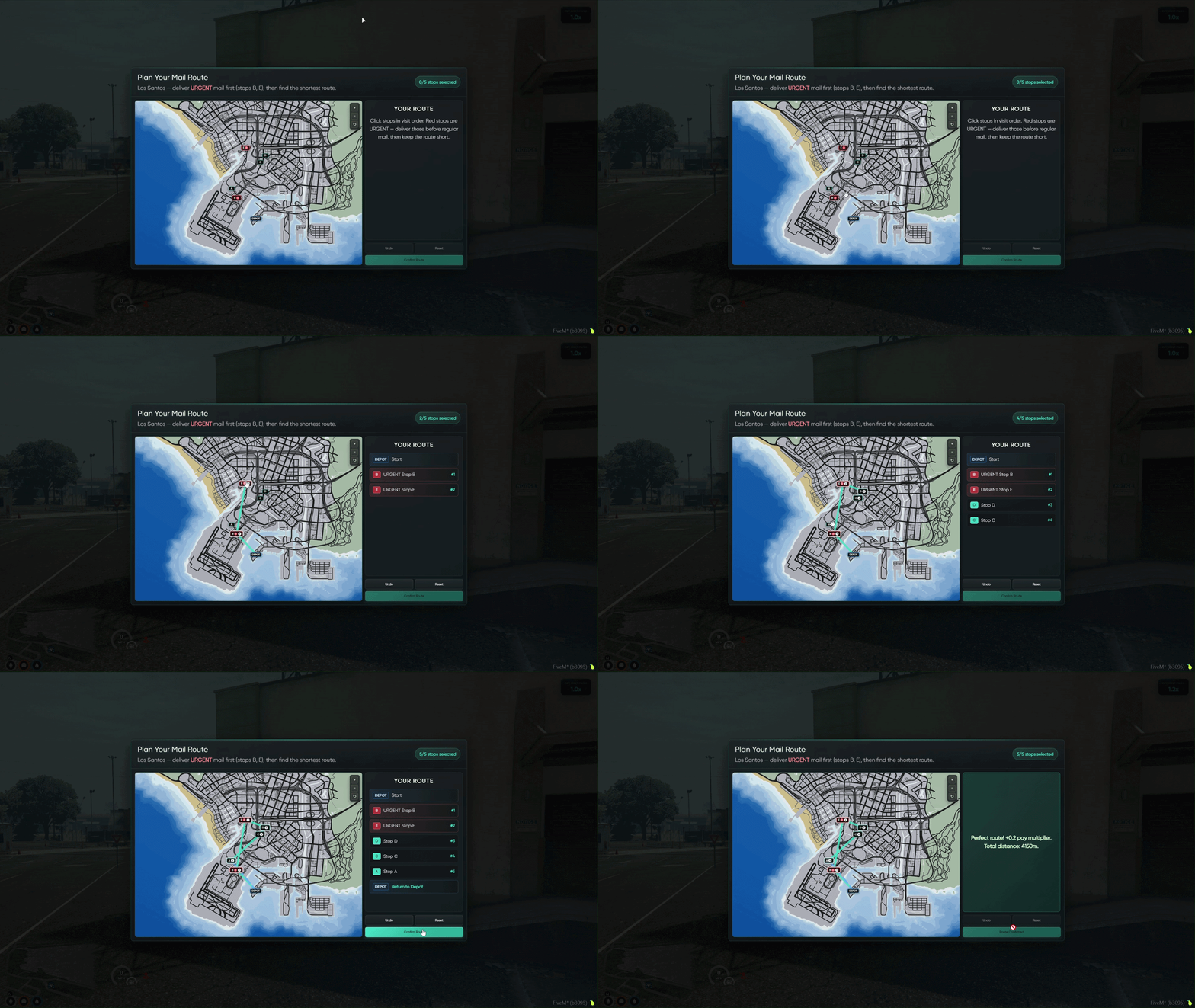
Route-planning minigame on the GTA map — pick the shortest path across all five stops while delivering URGENT packages first.

  • Plan Before You Drive — The route minigame opens at the start of every mail run.
  • Five Stops on the Map — Click delivery points on the interactive GTA map to set visit order.
  • URGENT Mail First — Red urgent stops must be completed before regular stops on your route.
  • Find the Shortest Path — Arrange stops into the most efficient loop back to the depot.
  • Confirm Your Route — Submit your plan and the game checks distance and urgent order.
  • Perfect Route Bonus — Nail the shortest path with urgent mail first and your pay multiplier goes up.
  • Wrong Order Costs You — A longer route or urgent stops placed too late deducts from your multiplier before deliveries even begin.
  • Start Strong — Smart planning sets the tone for the whole post van run.
Delivery Tablet Help

Delivery Tablet Help

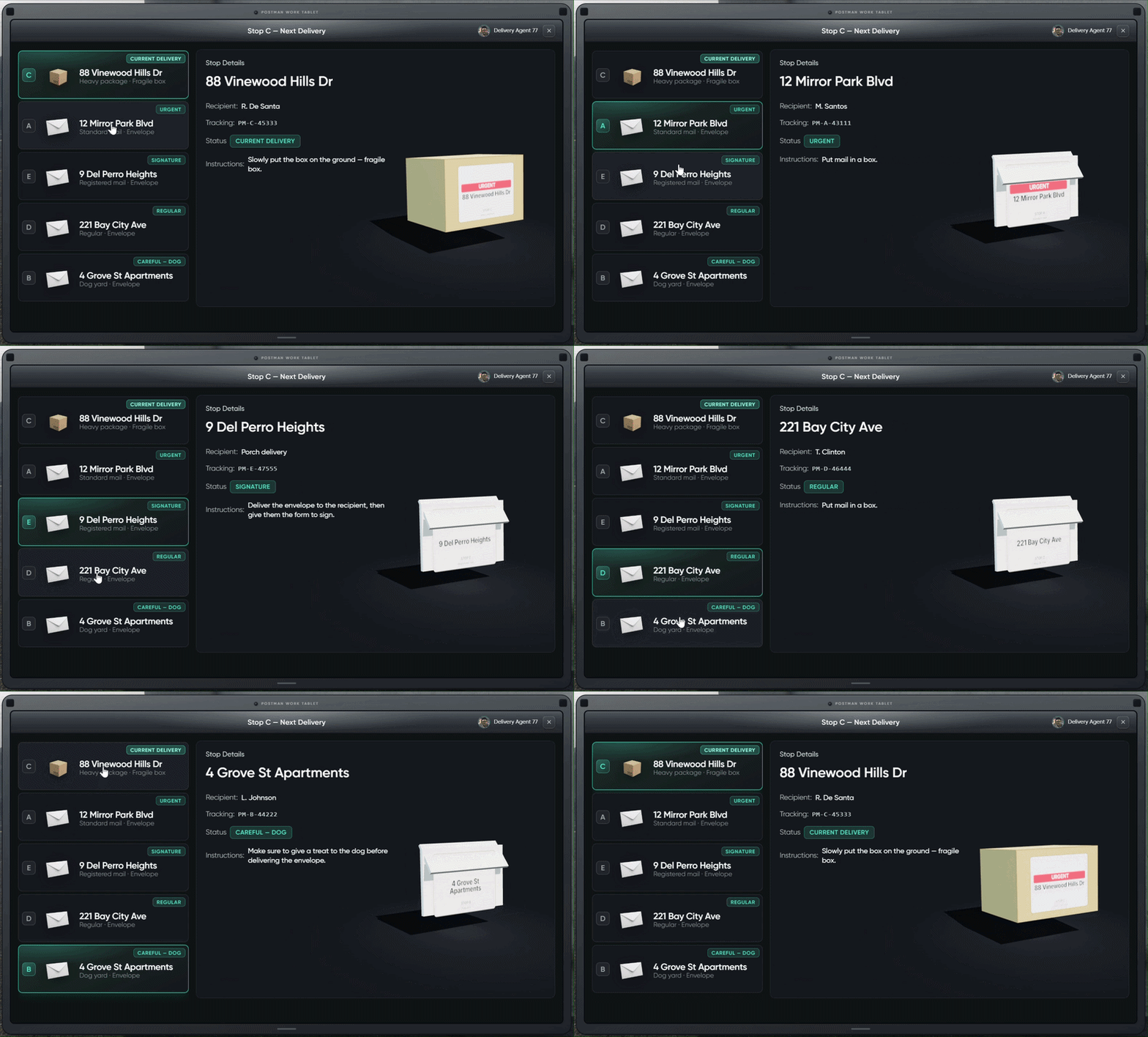
Postman Work Tablet shown before each stop — review your route, read stop instructions, and keep your reward multiplied instead of deducted.

  • Tablet Before Each Stop — Review your next delivery on the in-game work tablet before driving.
  • Full Route Overview — All five stops listed with letter labels, addresses, and delivery types.
  • Stop Details Panel — Select any stop to see recipient, tracking number, and current status.
  • Clear Instructions — Each stop type shows exactly what to do (mailbox drop, dog treat, signature, fragile box, etc.).
  • Current Delivery Highlighted — The active stop is marked so you know what is up next.
  • Protect Your Pay — Follow the on-screen instructions to avoid mistakes that deduct your multiplier.
  • Stay at Full Bonus — Clean deliveries keep your payout multiplier high through the entire route.
  • Mail Route Board — Pick your zone, choose difficulty, and start your post van run from one clean menu.
04/05

Electrician Job

Job + electric depot MLO

On its own 19.99€Included
Electrician Job for FiveM, in game

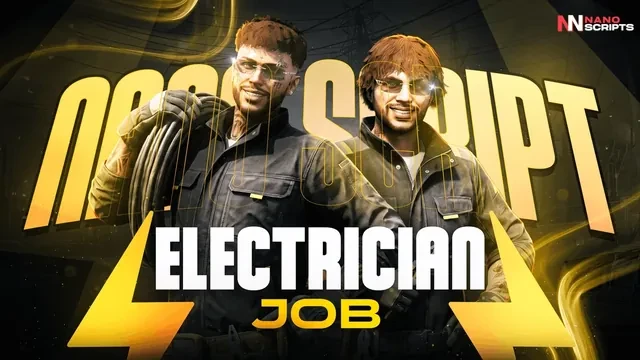
Keep the city powered with three minigames: voltmeter calibration, switch panels and breaker sequences. Custom Los Santos Electric depot MLO.

  • Voltmeter Calibration Dial I & R knobs to match the target voltage
  • Switch Panel Puzzle Flip toggles until each row indicator lights up
  • Breaker Sequence Game Watch the light pattern and repeat it back

This product comes with an escrowed library dependency.

See all 4 Electrician Job features Hide the Electrician Job feature tour
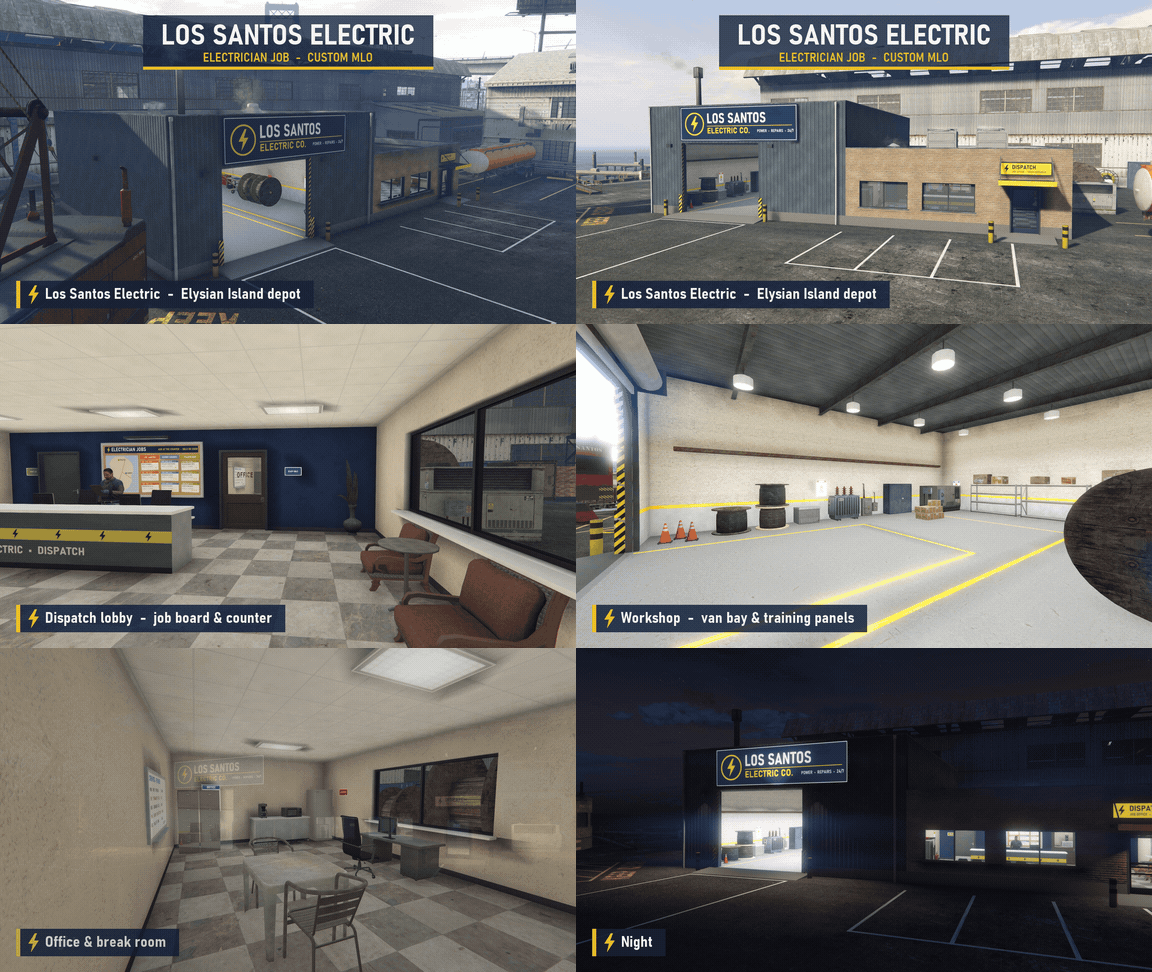
Custom Los Santos Electric MLO

Custom Los Santos Electric MLO

Custom Los Santos Electric depot MLO on Elysian Island, included with the resource — a full contractor base with a dispatch lobby, workshop, locker room, and break room.

  • Branded Exterior — Los Santos Electric Co. signage over the roller door and a marked parking lot outside.
  • Dispatch Entrance — A yellow-awning dispatch door leads straight into the front office.
  • Dispatch Lobby — Job board and service counter at the front of the building.
  • Workshop — Van bay and training panels for the service crew.
  • Locker Room — Rows of lockers and benches for crews to suit up.
  • Office & Break Room — A back office and break room for downtime between contracts.
  • Elysian Island Location — The depot sits in the port district on Elysian Island.
  • Night Lighting — Exterior lights and lit signage keep the depot looking sharp after dark.
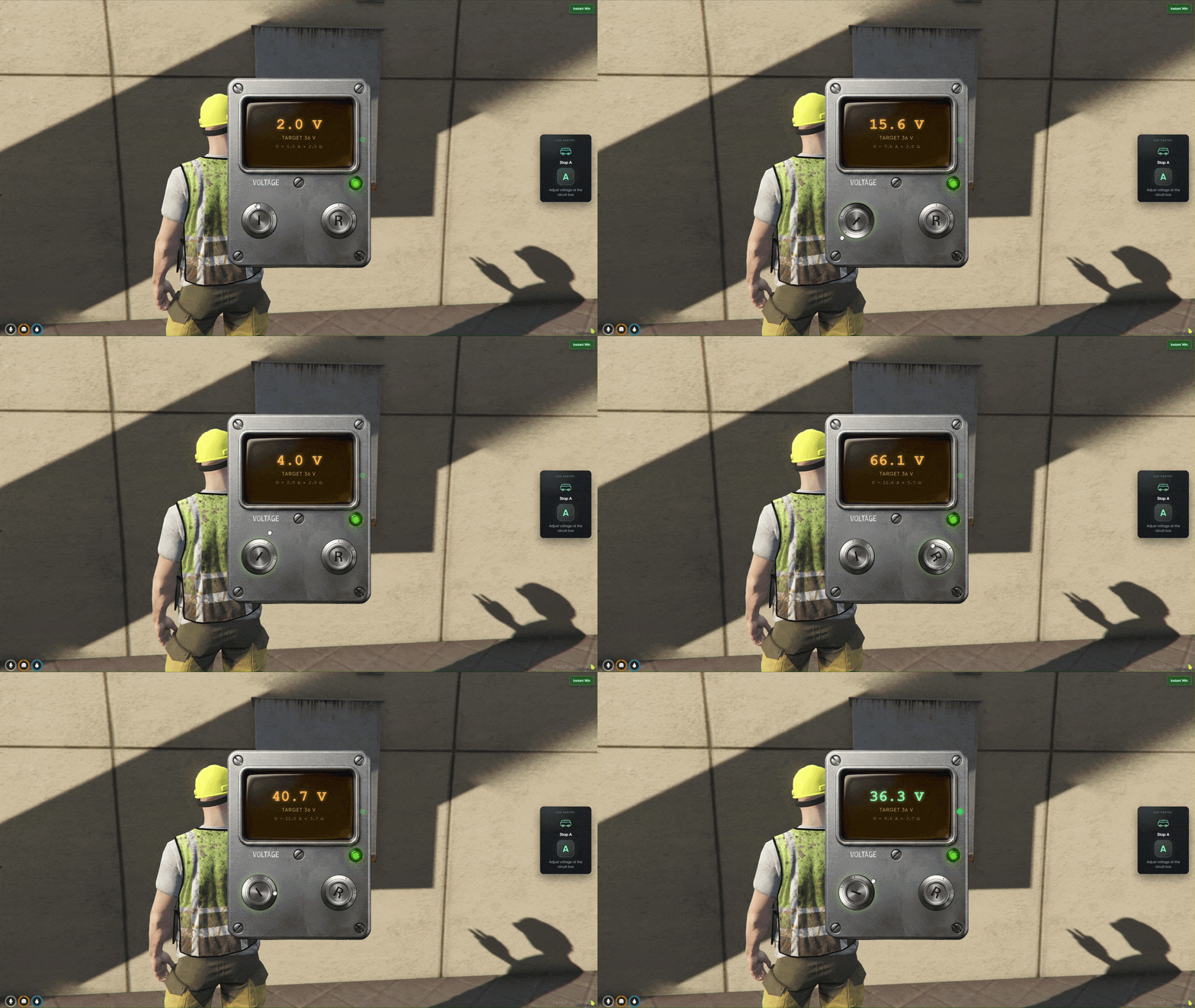
Voltmeter Calibration

Voltmeter Calibration

Voltmeter minigame at wall-mounted circuit boxes — rotate the current (I) and resistance (R) knobs until the reading matches the target voltage before time runs out.

  • Target Voltage Displayed — Each stop shows a target reading you must hit on the voltmeter UI.
  • Two Knob Controls — Drag the I and R knobs to raise or lower current and resistance.
  • Live Reading — The display updates in real time as you adjust both dials.
  • Hold the Match — Keep the reading on target for a moment to lock in a successful calibration.
  • Beat the Clock — Complete the calibration before the timer runs out.
  • Camera Zoom — The view smoothly frames the panel before the minigame opens.
  • Intro Animation — Your character pulls out the voltmeter prop before testing begins.
  • Dial Both Knobs — Current and resistance must both be tuned — one dial alone will not hit the target.
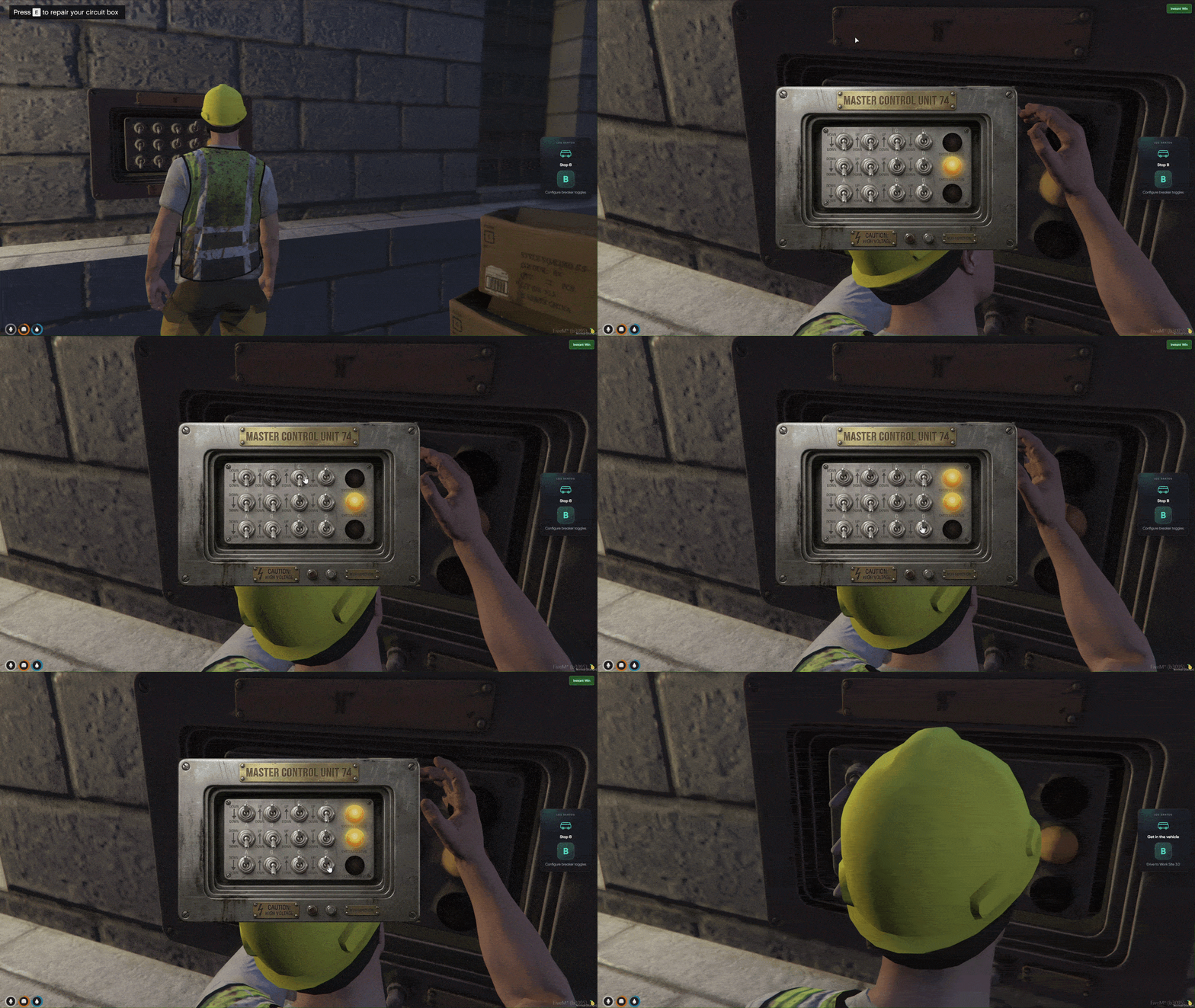
Switch Panel Puzzle

Switch Panel Puzzle

Toggle switch minigame on addon electrical panels — flip switches on a 4×3 grid until each row's indicator light turns on.

  • Switch Grid UI — Twelve toggle switches arranged in four columns and three rows.
  • Row Indicator Lights — Three lights on the side show which rows are correctly configured.
  • Click to Flip — Tap any switch to move it up or down.
  • Match the Pattern — Every switch in a row must match the hidden target for that row's light to activate.
  • Row-by-Row Progress — Lights turn on one row at a time as you solve the panel.
  • Timed Challenge — Finish all three rows before time expires.
  • Panel Work Animation — Your character plays a standing repair animation at the box before the UI opens.
  • Solve Every Row — All three indicator lights must be lit before the stop counts as complete.
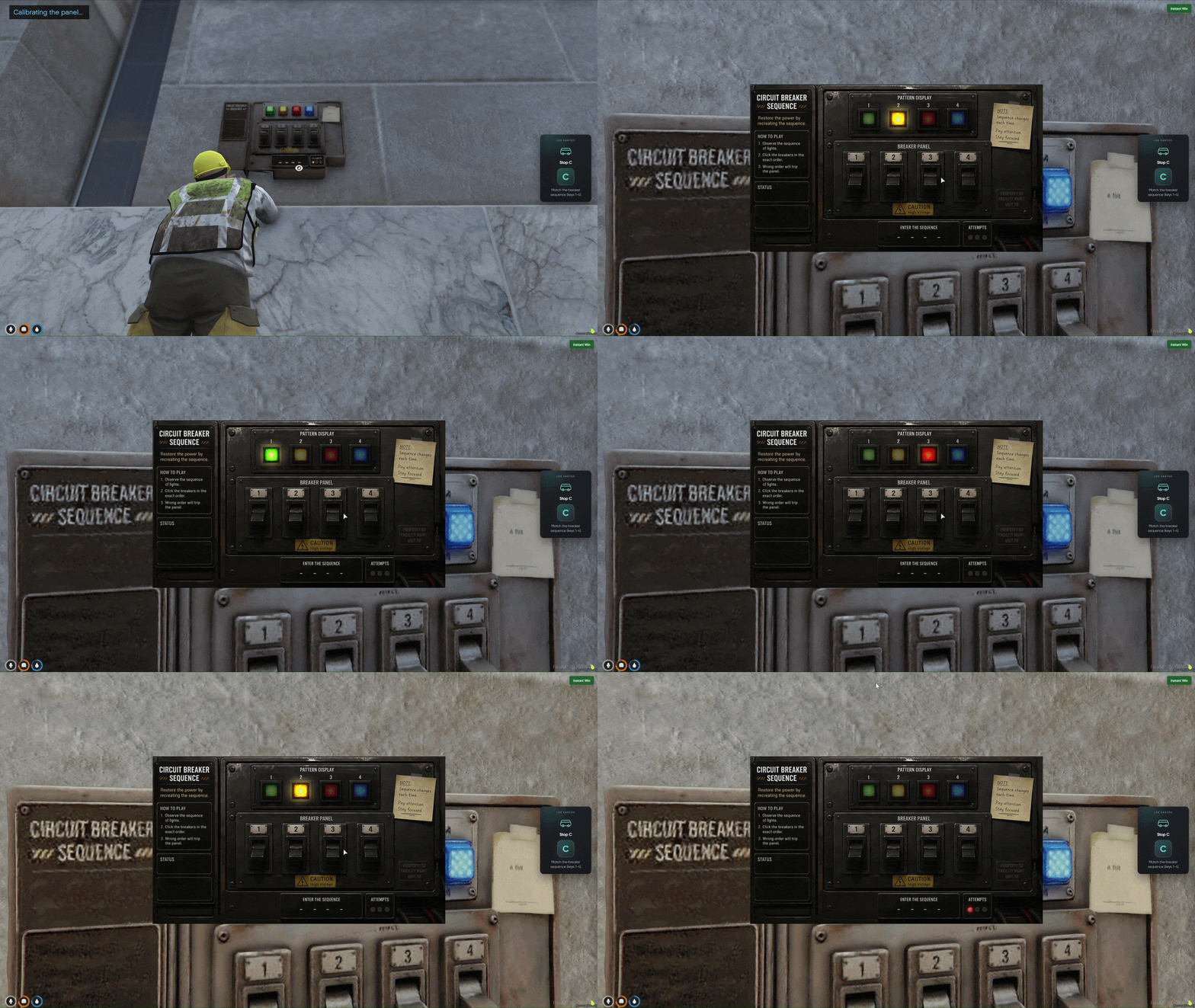
Breaker Sequence Game

Breaker Sequence Game

Simon-style breaker sequence minigame — watch four indicator lights flash in order, then repeat the pattern across four rounds to finish the stop.

  • Four Light Buttons — A row of breaker lights at the top of the panel UI.
  • Watch the Sequence — Lights flash one at a time in a random order you must memorize.
  • Repeat with 1 2 3 4 — Press the matching keys to enter the sequence you just saw.
  • Four Rounds Required — Complete four successful sequences in a row to finish the stop.
  • Three Attempts — Fail lights track your mistakes — three wrong inputs and the minigame fails.
  • Between-Round Pause — A short gap between rounds gives you time to reset.
  • Timed Pressure — The overall timer keeps running while you work through every round.
  • Memorize the Pattern — Watch closely during the flash phase — you only get three strikes before the panel fails.
05/05

Baywatch Job

Job + lifeguard HQ MLO

On its own 29.99€Included
Baywatch Job for FiveM, in game

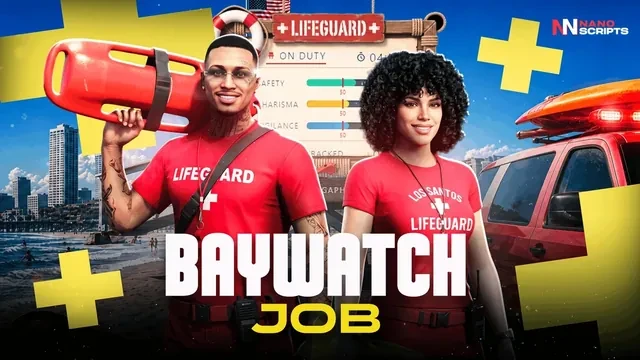
Lifeguard shifts on Vespucci Beach: scan swimmers, throw the rescue buoy, tow them in on the jet ski and perform CPR. Custom Lifeguard HQ MLO.

  • Shift Tutorial & Clock In Learn the job at HQ, then start your lifeguard shift
  • Binocular Water Scan Hold zoom on swimmers to check range and raise Vigilance
  • Rescue Buoy Throw Throw the ring to strugglers and tow them back on the jet ski
  • Unconscious CPR Rescue Load victims on the ski, bring them to shore, and perform CPR
  • Muscle Beach Weights Hit the bench minigame to keep Charisma up between rescues
  • Lifeguard Stats HUD Safety, Charisma & Vigilance decide your pay at clock-out
  • Shift Rewards UI Animated payout board with stat cards and claim button
See all 8 Baywatch Job features Hide the Baywatch Job feature tour
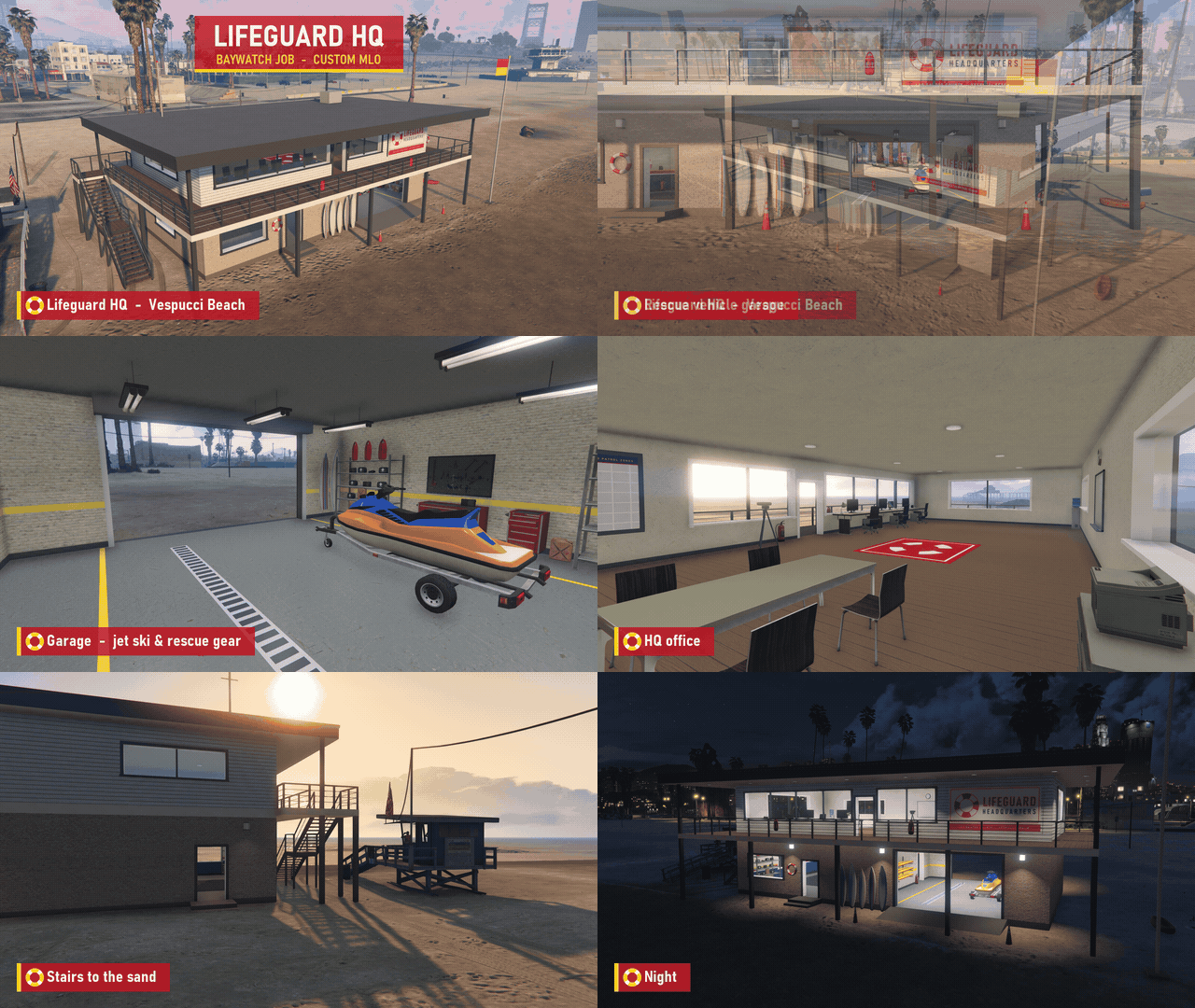
Custom Lifeguard HQ MLO

Custom Lifeguard HQ MLO

Custom Lifeguard HQ MLO on Vespucci Beach, included with the resource — a raised beach headquarters with a rescue garage, gear room, office, and an observation deck over the sand.

  • Vespucci Beach HQ — LIFEGUARD HQ signage on a raised building right on the sand.
  • Rescue Vehicle Garage — A garage built into the base of the HQ for the rescue vehicles.
  • Jet Ski & Rescue Gear — The garage holds a jet ski and rescue equipment on display.
  • Lockers & Gear Room — Lockers under the LIFEGUARD sign for suiting up before a shift.
  • HQ Office — Desks and workstations for the lifeguard team.
  • Observation Deck — An open deck looking out over the beach and the water.
  • Stairs to the Sand — Direct stairs from the HQ down to the beach.
  • Night Lighting — The whole HQ lights up after dark.
Shift Tutorial & Clock In

Shift Tutorial & Clock In

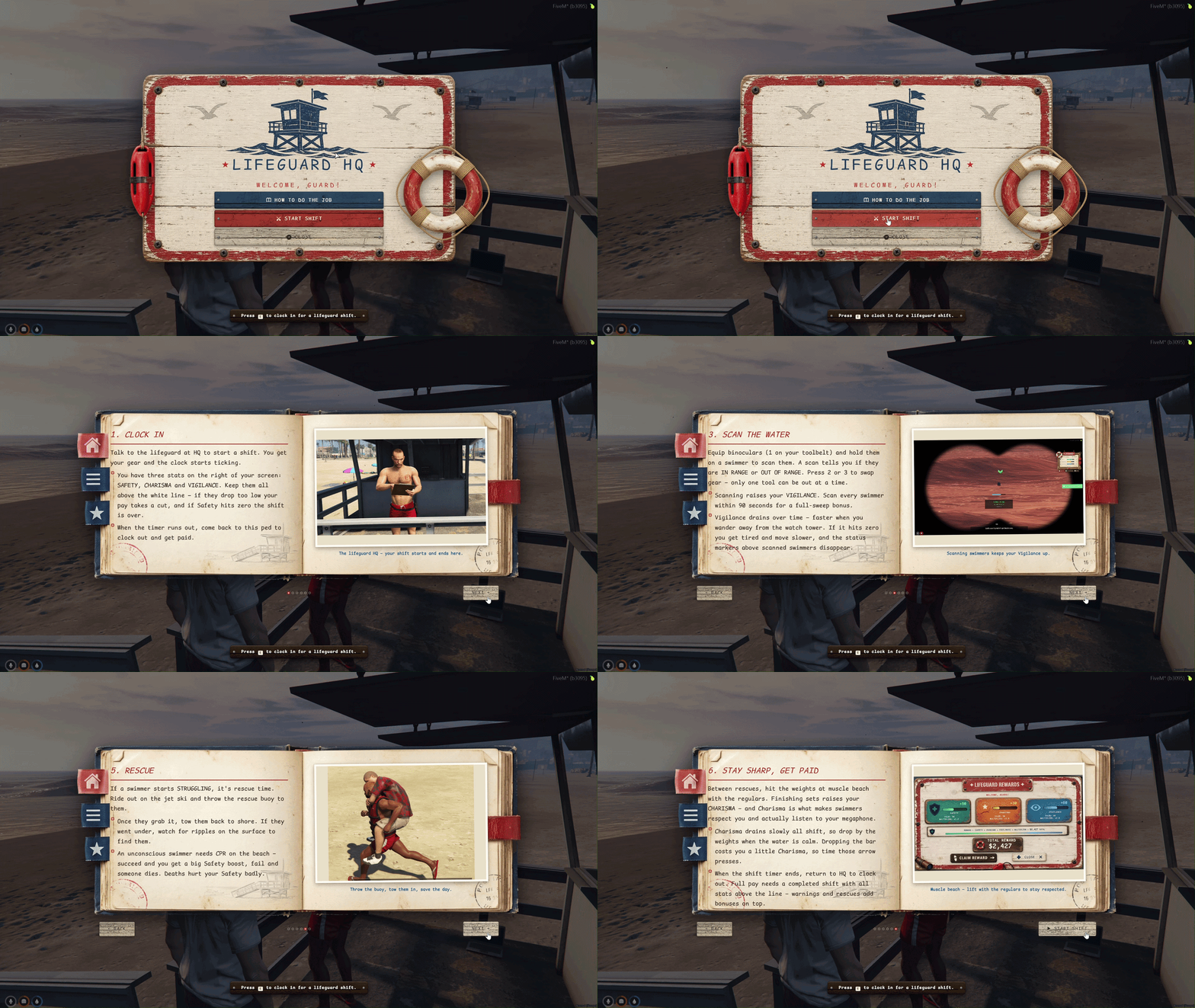
Interactive tutorial book shown at the Lifeguard HQ ped before you clock in — walks players through the full shift loop, stats, gear, and how to get paid.

  • Talk to the Lifeguard — Press E at HQ to open the tutorial and start your shift.
  • Six-Page Guide — Clock in, jet ski, scanning, megaphone warnings, rescues, and muscle beach.
  • Left Page Text — Each spread explains what to do and why it matters for your stats.
  • Right Page Screenshots — Visual reference for every major step of the job.
  • Gear on Clock-In — Binoculars, megaphone, and rescue buoy go on your toolbelt (1 / 2 / 3).
  • Lifeguard Uniform — Baywatch outfit is applied when the shift starts and restored when it ends.
  • Shift Timer Starts — HUD appears with Safety, Charisma, Vigilance, and time remaining.
  • Return to HQ — Come back to the same ped when the timer ends to clock out and claim pay.
Binocular Water Scan

Binocular Water Scan

Look-through binocular overlay with smooth zoom — hold the crosshair on a swimmer long enough to scan them and raise your Vigilance.

  • Press 1 on Toolbelt — Equip binoculars from your lifeguard gear slots.
  • Smooth Zoom — Scroll to zoom in tight on swimmers far out in the water.
  • Hold to Scan — Keep the crosshair on a swimmer for 2 seconds to complete the scan.
  • IN RANGE / OUT OF RANGE — Each scan tells you whether the swimmer is inside the safe zone.
  • Status Markers — Scanned swimmers get color chevrons above their head (green, yellow, orange, red).
  • Vigilance Boost — Every scan raises Vigilance; scan everyone within 90 seconds for a full-sweep bonus.
  • Works on Jet Ski — Press B while riding to toggle binoculars without leaving the ski.
  • Full-Sweep Bonus — Scan every swimmer in the zone within the sweep window for extra Vigilance pay.
Rescue Buoy Throw

Rescue Buoy Throw

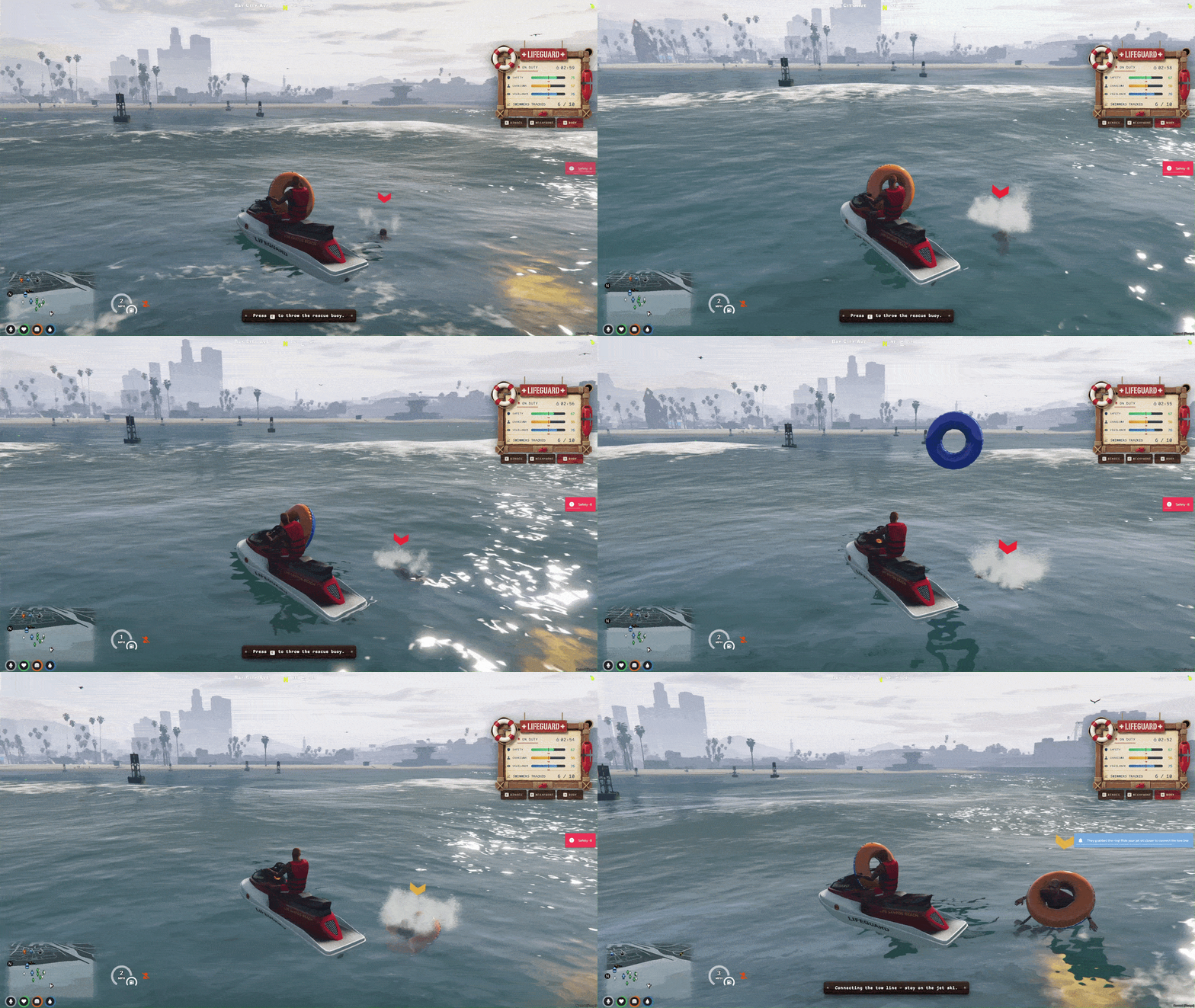
Throwable rescue ring for panicking swimmers — equip the buoy, ride out on the jet ski, throw it to a struggler, and tow them back to shore on a rope.

  • Press 3 on Toolbelt — Equip the rescue buoy in your hand.
  • Ride the Jet Ski — Blip leads you to the dock; press F to hop on and reach the swim zone fast.
  • Throw the Ring — Press E to toss the buoy at a struggling swimmer (longer range from the jet ski).
  • Victim Grabs It — They cling to the ring and tread water while you line up the tow.
  • Rope Tow Behind Ski — A visual tow rope reels them in and trails behind the jet ski.
  • Splash & Panic — Struggling swimmers flail in the water with splash effects and audible distress.
  • Tow to Shore — Pull them back toward the green buoy line, then unload on the beach for CPR if needed.
  • Rescue Pay Bonus — Every successful tow and rescue adds to your shift payout at clock-out.
Unconscious CPR Rescue

Unconscious CPR Rescue

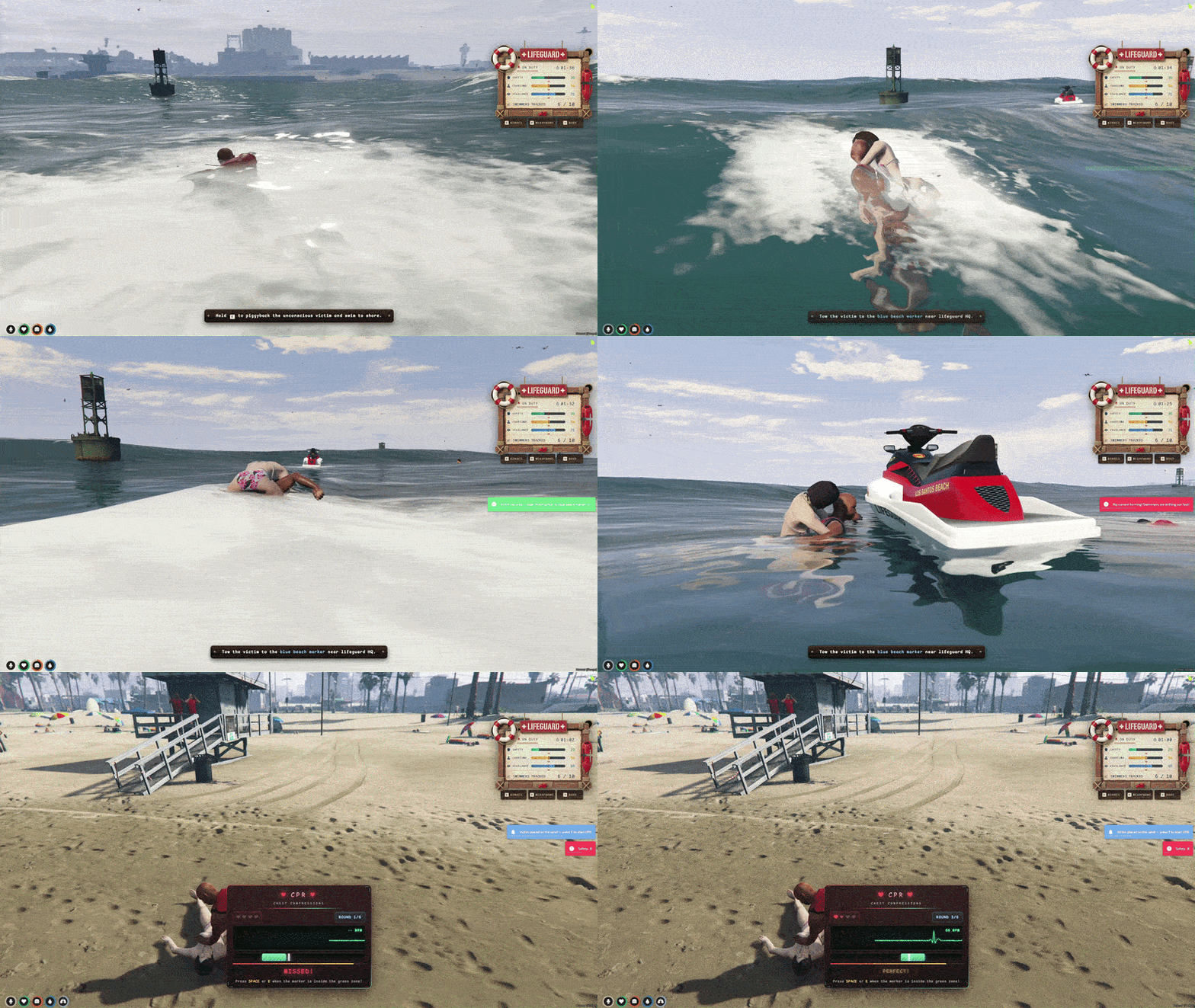
Full rescue chain for swimmers who went under — load unconscious victims on the jet ski, tow them to the beach, and perform a timed CPR minigame to revive them.

  • Unconscious in the Water — Swimmers who struggle too long go limp and float face-up on the surface.
  • Load on Jet Ski — Dismount near the victim and hold E to piggyback them onto the ski.
  • Tow to Beach — Ride back to the shore drop zone near HQ with the victim on your lap.
  • Place on Sand — Unload the unconscious swimmer on the beach for emergency treatment.
  • CPR Minigame — Hit SPACE in the green zone across multiple compression rounds to revive them.
  • Big Safety Boost — A successful revive raises Safety; a failed CPR or death hits it hard.
  • Shift Over on Death — Any swimmer death during the shift applies a heavy penalty and can end the run.
  • Watch for Ripples — If they went under, scan the surface for ripples to find them before it is too late.
Muscle Beach Weights

Muscle Beach Weights

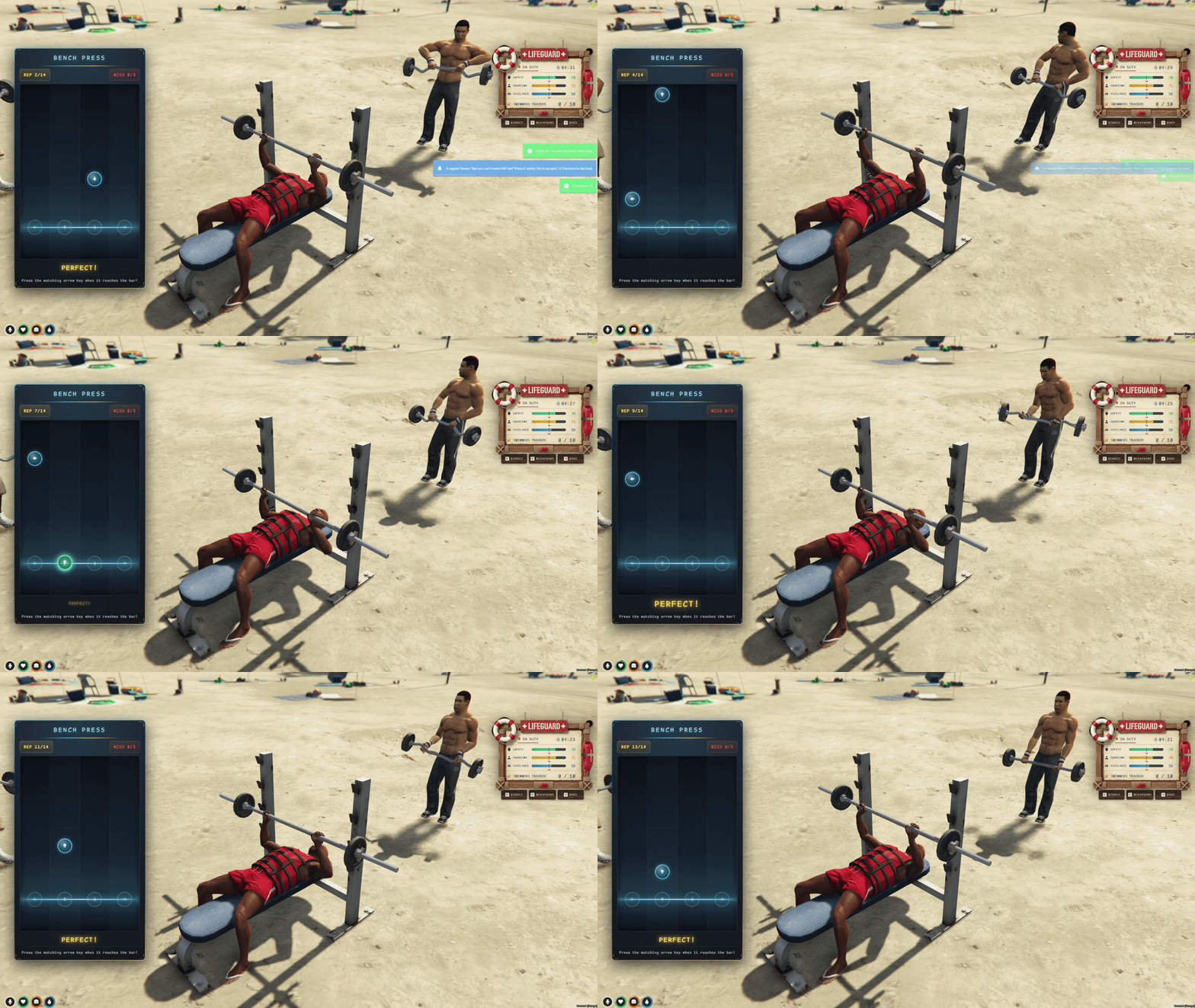
Bench press rhythm minigame at Muscle Sands — lift with the regulars between rescues to keep Charisma up so swimmers actually listen to your megaphone.

  • Muscle Sands Blip — Follow the map marker to the beach weight area near HQ.
  • Press E at the Bench — Sit on the player bench and start a lifting set.
  • Arrow Rhythm UI — Arrows fall down four lanes — press the matching key when each hits the bar.
  • Ten Reps Per Set — Complete the rep count before too many misses or you drop the bar.
  • Charisma Boost — Each finished set raises Charisma (diminishing returns if you spam back-to-back).
  • Drop Penalty — Missing too many arrows drops the bar and costs a little Charisma.
  • Regulars on the Sand — NPC lifters work out around you so the beach feels alive between calls.
  • Megaphone Range — Low Charisma cuts your warning range in half and swimmers may ignore you.
Lifeguard Stats HUD

Lifeguard Stats HUD

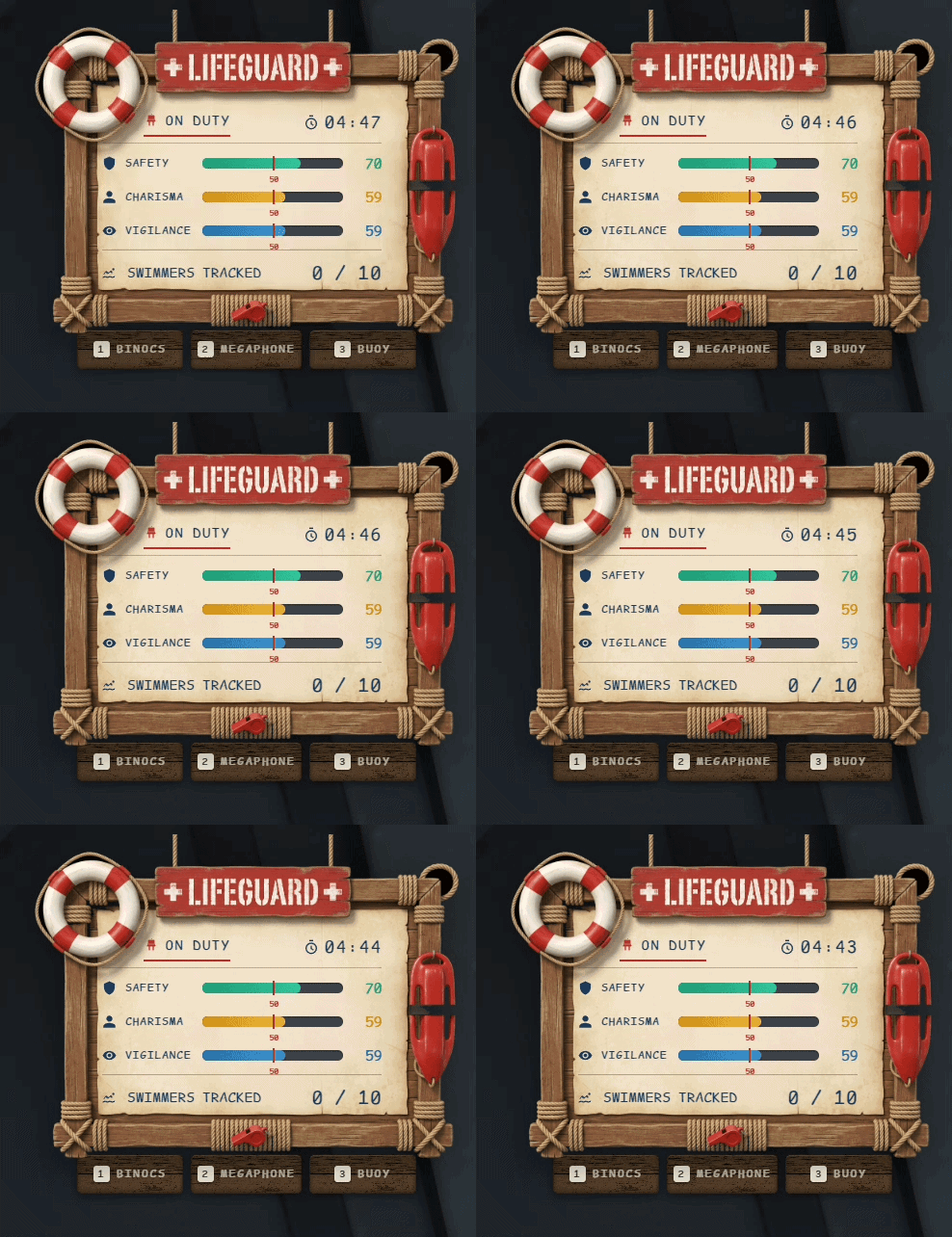
Three live stat bars on the right of the screen — Safety, Charisma, and Vigilance — with a shift timer and surveillance counter that decide your payout at clock-out.

  • Safety — Goes up from megaphone warnings and successful CPR; drops from unwarned drownings and deaths.
  • Charisma — Goes up from weight sets; drains over time and controls megaphone range and respect.
  • Vigilance — Goes up from binocular scans; drains faster when you wander away from the watch tower.
  • White Threshold Line — Keep all three stats above the line for full base pay and the exemplary bonus.
  • Shift Timer — Countdown shows how long is left before you need to return to HQ.
  • Surveillance Counter — Tracks how many swimmers you have scanned out of the total in the zone.
  • Exemplary Shift — Finish with all stats above the threshold and zero deaths for a big bonus.
  • Safety at Zero — If Safety hits zero, the shift fails immediately.
Shift Rewards UI

Shift Rewards UI

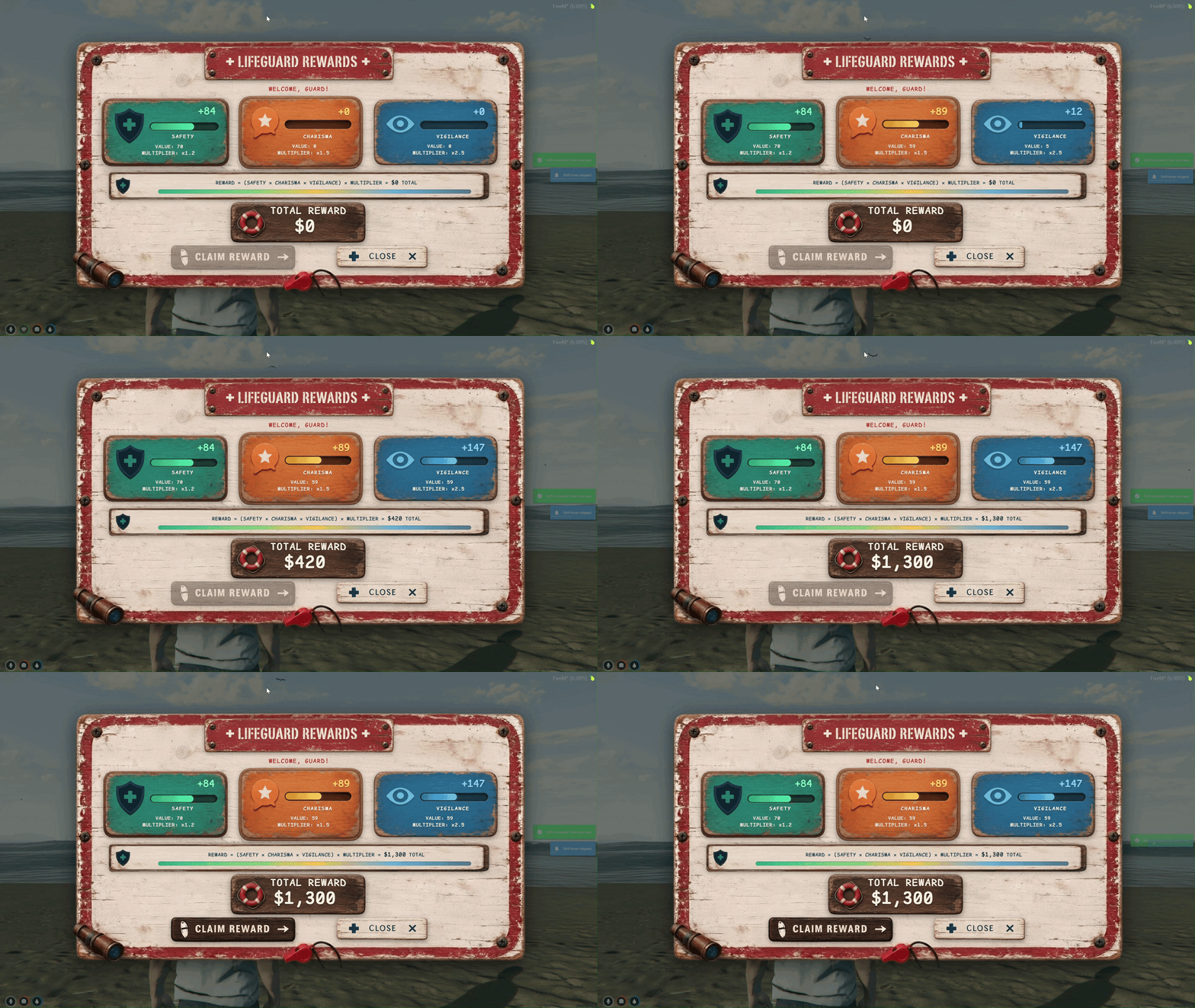
Animated end-of-shift rewards board shown when the timer runs out or you clock out at HQ — three stat cards fill in one by one, then the total payout counts up before you claim.

  • Opens on Shift End — Board appears automatically when the shift timer hits zero or you return to HQ to clock out.
  • Three Stat Cards — Safety (green), Charisma (orange), and Vigilance (blue) each show value, multiplier, and bonus.
  • Animated Fill Bars — Each card's bar and bonus number count up in sequence so players see what they earned.
  • Formula Breakdown — On-screen formula shows how Safety × Charisma × Vigilance feeds into the total reward.
  • Total Reward Plaque — Large payout number animates at the bottom once all three stats have played in.
  • Claim Your Pay — Click Claim Reward (or press E / Enter) to collect cash on the server.
  • Pending Payout — Close by mistake? Press E again while off duty to reopen the board until you claim.
  • Rescue & Warning Bonuses — Warnings and rescues during the shift stack on top of your stat-based total.

More packs

Growing the server? Stack another pack.

Reviews

Server owners say it best.

4.97/ 5 from verified customers

I was having issues with permissions within the script (my fault not theirs). They came in with an immediate fix and update to the script so it worked perfectly in my server. Their customer service and script is top notch! Thank you dev team!
M. FreemanBought Police Creator
Amazing script. Very active and attentive support. Speaks in all languages, which is very convenient for us!
jiou.reBought Restaurant System
Even while busy they still got what I needed done without any hassle or fighting. Top tier as always Nano.
King KyBought Business Creator, Appearance Menu

Before you buy

Questions, answered.

Is every script the full version?

Yes. Each script in a pack is the same one sold on its own page, with every feature and lifetime free updates. You simply pay less for the set.

Escrow or Open Source: which one do I need?

Both give you identical features and updates. Escrow is protected by FiveM asset escrow: a clean drop-in install at the lower price. Open Source gives you the full source code to read, study and customise for your server.

Which frameworks are supported?

ESX, QBCore and QBox. You install a single resource no matter which framework you run, and switching later does not need a new purchase.

How do I get the files?

Right after checkout. Download each script, drop it into your resources folder and ensure it in server.cfg. Most scripts ship with a step-by-step setup guide.

What if I need help installing?

Every purchase includes lifetime free updates and direct access to our Discord support team for installation, configuration or any issue you run into.

Something else? Ask us on Discord

Civilian jobs

Five jobs. Five MLOs. One click.

5 full scripts for 60.99€, and you keep 48.96€.

Add 5 Jobs Pack to basket
  • Instant delivery
  • Lifetime free updates
  • Discord support